

B&G Triton, first look’s good
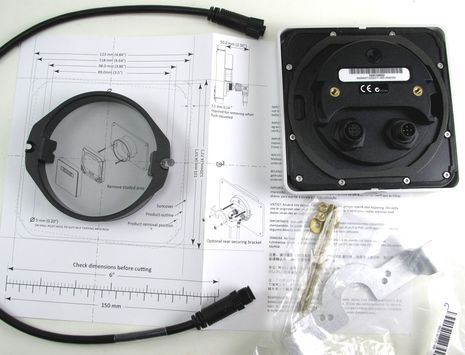
I’m starting out with a backside shot of the B&G Triton T41 color instrument display — first announced here last September — because I’d like to highlight the novel installation scheme. After fastening that flanged collar at left into the appropriate size hole, the Triton simply inserts and twist locks — or vice versa — without the need of a tool, and also without any “snap on/off” fastening covers to get broken or lost. It worked fine for me in the lab, and I suspect it will work fine on Gizmo’s bridge, but the very day I took this picture I stumbled on an early Triton user who doesn’t like this system at all…
The unhappy beta unit owner/installer was Jeffrey Schwartz of Miami and I’m not sure if his hole was a little too large — it does seem like the flange could be bigger and accommodate more than two fastenings — or whether the location lacked the space left or right to allow for the twist and lock motion (see dotted line on the diagram). But I do understand that a Navico representative was there when Jeff had has install problems and that may account for the optional rear-mount “retention bracket” also seen in the photo above. Point validated: it’s hard to design marine electronics that will fit every boat situation, and it’s also hard to review them!
You may also notice in that booty shot that the Triton utilizes the standard DeviceNet-style NMEA 2000 connector — a Navico trend away from SimNet, it seems — and that it has two of them so that these displays can be daisy chained if desired. Which means that like most every other all-in-one N2K instrument display, the Triton is not NMEA 2000 certified, as ranted about here. The main NMEA worry is that if one chained display fails, others upstream will also lose contact with the boat’s backbone, but in this case an informed user could simply untwist the broken display and screw the two N2K drop cables together. Not that I’ve ever seen any brand’s all-in-one fail…
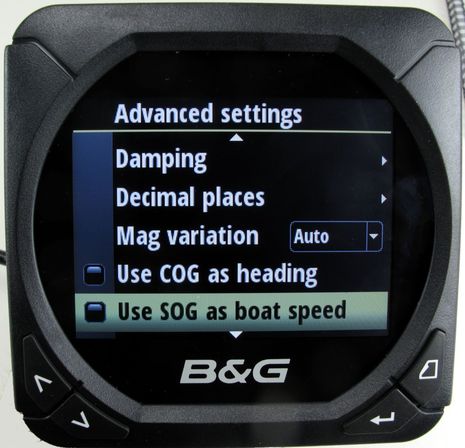
At any rate, what I’m noticing in the Triton so far are a lot of nuances that will appreciated by sophisticated sailors, as in some of the Advanced Settings seen above. For instance, while it may not be “correct” to substitute SOG for boat speed through the water — as well explained in the interesting “essential guide” available on B&G’s Triton page — it’s still good to have the option…

The Triton also offers a lot of calibration options, and (like Furuno instrument displays) they are independent of the particular N2K transducer in use. That seems to mean that the corrected values stay local to Triton — as opposed to becoming system wide — but it also makes it easier to add a Tritont even if your boat doesn’t have other B&G or Simrad gear.
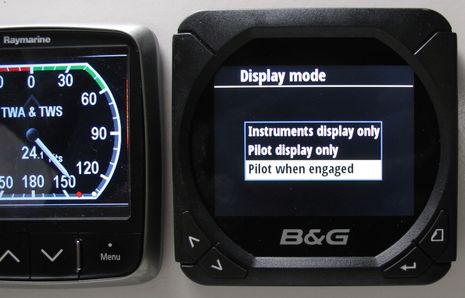
Note that I posed the T41 next to a Raymarine i70 because there are many similarities. The Triton, for instance, has lots of pre-built “fancy” screens somewhat similar to the one at left — including the best apparent/true wind “gauge” I’ve seen — but both also offer all sorts of ways to build custom screens…

I think that it was actually the Garmin GMI 10 which first demonstrated how useful all-in-one NMEA 2000 instrument displays can be, but I have to say that now it’s looking a little elderly compared to the bigger-screened competition. But then again Garmin has been amazing at adding support for more and more N2K data types — even engine trouble lights — and plus it may well have a i70/Triton “killer” in development.
At any rate, all three displays will be installed on Gizmo soon and I look forward to comparing them further. I’m particularly interested in the Triton’s so-far unique ability to become an autopilot display with the addition of the Triton keypad, which I will also install.



Ben on Vacation = “So many days, so little gizmos!” rather than “So many gizmos, so little time!”
http://goo.gl/OFHIh
While the twist-lock idea is clever, it certainly hinders “tight” installations where instruments need to be packed together as closely as possible. A recessed press-to-remove tab would work just as well and not require twisting. I see the very large rectangular flange on the back which will interfere with mounting next to other instruments as well and often require trimming to fit.
Well, let’s note that the twist only requires 0.14 inch on each side, and you need most of that anyway for the sun cover. You can see these details if you click/enlarge the top photo.
I don’t understand what you mean by “the very large rectangular flange on the back”?
By the way, the rectangular Triton ap control pad uses the same install scheme, including the optional bracket.
As Ben noted above I have had this B&G Triton T-41 on board our Beneteau Oc-400 12 meter sailboat for a few months now. This instrument was installed in a cut-out hole in a teak “dashboard” mounted just over the companionway. This dash set-up had four Simrad IS-20’s mounted in it…(from port-starboard) Graphic, Combi, Tack and Wind instruments. I removed the IS20 Tack, moved the IS20 wind into the hole from the Tack and installed the new B&G Triton T-41 in its place. I must first digress a little; these mounting holes were originally filled with Raytheon/Autohelm then Raymarine ST-60’s then the Simrad IS-20’s…all had different cut out holes. All four IS20 units were installed very close to each other and as Dan noted above the twist-lock set up of the T-41 made this change very tight but it was doable.
The installation issue was with the mounting clip, as the original hole was just slightly larger than is necessary for this unit. There was not really enough surface area for the mounting screws that held the mounting clip in place and this clip sort of floated in the larger mounting hole. I have been meaning to create a “donut” filler piece for this but just have not been able to find the time. Now with the release of the “Additional Retention Bracket” I will not need to fabricate that filler. Currently if you grab the unit to take off the Suncover, the unit sometimes comes loose and has to be snapped back into place.
Because there is an IS20 next to this unit that uses four face mounting screws it will be an easy retro fit to install that retention bracket using the adjacent hole. As far as the wiring goes it was literally plug & play. Used a Simnet to NMEA 2000 cable out of the adjacent IS20 to the new T-41 and turned on the equipment. The addition of the rear mounting clip will also allow me to add some thin but IMHO necessary gasket material to seal the back of the T-41 to the dashboard. I am not sure if the twist lock even if done correclty will hold the unit tight enough against the mounting surface to be water tight.
I find the display to very bright in daylight with sharp/crisp graphics as well as large and easy to read text from the helm position. In this install the wide viewing angle helps when trimming the headsail from the port winch on the opposite side from where the instrument is mounted. When racing at night the Red night mode works well. I also like the fact that it has extremely low power consumption.
In addition to still having to add the rear mounting clip I also need to find out why the wind speed display on the IS20 do not match that on the T-41? Direction matches perfectly but the speed does not? Wind data is sourced from the Airmar PB-200 located at the top of the mast and fed via NMEA 2000 to all other instruments which are all mostly Simrad. There is an additional AP24 autopilot head and IS20 Graphic at the nav station below, along with the NAIS 300 & BSM-1. Topside in addition to the three IS20’s and T-41 we have Simrad 2k radar, AC42 Autopilot, HLD 2000L Linear Drive, RF300 Rudder/Feedback, RC42 Rate Compass with the AP28 head feeding the NSE-8 and a Lowrance HDS-7 at the helm.
Other than the mounting issue this install had and different wind speed readings which are still a mystery to me, I am very happy using this new T-41 instrument, especially when racing.
Jeffrey Schwartz
A customer of ours has opted for the Triton display and autopilot controller for his Simrad autopilot, instead of the usual Simrad AP24.
A better, brighter, and more reliable (bonded) display, it also offers more flexibility (it can display other things when pilot is not in use).
His Simrad MFD can be used to control the pilot for advanced features such as turn patterns and depth contour tracking, as only the core autopilot functions can be accessed from the Triton control panel (but are still available on the “Triton” autopilot).
I suspect many more will become fans of this display for both Autopilot and as a replacement for the Simrad IS20.
http://www.invisiblecommunications.com.au
[email protected]
The main NMEA worry is that if one chained display fails, others upstream will also lose contact with the boat’s backbone
That’s what I thought the NMEA issue was too, but it may be slightly different. Someone with the full standard could check. Maretron’s catalog says this:
it is a requirement to be able to remove a component from the network without affecting any other device — the subtlety here is that there is no momentary break while you reconnect cables.
Can it make any difference whether an external Tee is used or if it is built in? NMEA thinks so.
http://www.nmea.org/Assets/20100414%20daisychaining%20internal%20diagrams%20drawing%202.pdf
Note the text here:
Internal Wiring of Data Pair and Power Pair are not Controlled Impedance or Gauge, which Affects Downstream Products
It must be possible to design the product to meet any standard. However, this is not the real issue. Note the other huge but subtle difference in the two diagrams in that web page — they are breaking the *trunk* with that device. Does anybody put displays on the trunk? Is that even legal?
Now read this NMEA quote:
http://www.nmea.org/Assets/final_rtcm_2002_white_paper.pdf
That might say you can daisy-chain as much as you want on a drop; just don’t do it on a backbone. If a barrier strip connection is approved, I’m sure the wiring in an internal Tee would be have an even better quality. Maretron has a multi-port box which is approved; replacing that device would definitely affect downstream devices.
NMEA should rethink this.
Nice looking AP control/display.
Exactly which APs is BandG specifying that the Triton is compatible with? I ask because I wanted to know the same answer about its cousin, the Simrad AP24 and the TP32. I asked Navico support and got this:
We’ve never tested the TP32 with the AP 24 and AC12. The Simnet version from the older products was very primitive, and I’m not sure what information will pass to and from the AP24. I wouldn’t recommend the interface as it HASN’T been tested.
One issue that has not been mentioned about any new instrument display is the readability during the day in bright sunlight and at night. Do any of these displays have an ambient light sensor to auto-dim when the sun goes down? If not, how well buried is the menu item that changes brightness.
My Garmin GMI 10, displays beautiful color and ample brightness during the day, but requires going into the menu to change both brightness and night color. The GMI-10 is supposed to change both brightness and color for all displays on the N2K network when you change one, however, I have yet to find this works. I do have the first generation GMI-10’s with the latest software so maybe the older ones never had this ability.
So far, I have not seen better night readability then our prehistoric NEXUS instruments. At night I just throw one switch and all instruments are on night color. They never blind the navigator and are readable during the day.
New displays need to address Day/Night readability and ability to quickly change from day to night. Auto sensing should be the target feature for any new display just like it is on a Garmin chartplotter. Brilliant lighting and color on new displays at the boat show, does not always translate into a better display out on the water.
I’m not a fan of these colour graphic displays as a general rule, too much information crammed into the available screen real estate to make them useful in the cockpit. They also tend to be too bright at night with fiddly brightness controls. The viewing angles at low levels of illumination are very bad. The large screens also make the area available for the bottoms too small making operation difficult with wet, cold or gloved hands. All of those comments apply to many of the new units coming onto the market.
This mount looks flimsy to me and not very waterproof. Theft must also be a big concern; perhaps the rear mount retention bar will help, but what a ball-ache. Rear access is essential for secure mounting and waterproofness IMO.
buttons not bottoms 😉 Damned ‘smart’ spell checkers!
How can displays show too much information if you can make custom screens that show just what you want? For instance, what could be simpler and more visible across a cockpit than those big depth numbers above? (There is an argument that the decimal feet are necessary but I think the reduced font size takes care of that.)
Sorry, Tweed, but I also think you’re wrong about viewing angles and night lighting. I know for sure that the i70 does very good low lighting and that the Triton has very large left and right viewing angles but will check all on boat soon.
Tweed, what color graphic display has you so turned off? Except for the fiddly brightness controls in earlier models, I struggle to understand where your coming from.
Take a look at this Panbo entry on how color graphic displays have added to my boating enjoyment: http://goo.gl/UYhdb
You are actually supporting my argument there Ben, If you switch the display to only show big digits you may as well not install a multifunction display. Install a few cheaper ones that will do a single function well instead and still see all the information.
They’ll probably have buttons you can operate too 🙂
I don’t have experience with this unit but generally speaking the viewing angles with the lighting turned down to about 15% or so; which you need on a moonless night, are rubbish on the colour displays. This also applies to most plotters and MFDs. Go on many boats that do a lot of miles offshore at night and you’ll see all manner of devices to reduce glare from the lighting Ive seen, and used, shades, , neutral density filters and even resorted to putting the sun cover on when it’s been really dark.
Everybody is entitled to an opinion but in my opinion you are not entitled to tell me that I am ‘wrong’. I have a different opinion to you but it’s a valid opinion based on my experience at sea.
I am an electronics engineer and a gadget person; I love trying the new toys. I’m also an active sailor sailing some 20,000 or so miles a year on long enough trips that means that probably a third of that is at night. I’m not making this up.
I’ll hold my hands up and state that I have no experience of this unit,. If somebody gives me one I’ll happily install it and let everybody know how it works.
Nah, Tweed, that’s a new argument you think I’m supporting. Of course there are less expensive monochrome instrument displays that can deliver some numeric data pretty well. (But I’m not sure they’re a good deal anymore when you realize how versatile the color all-in-ones have gotten, and how they can become more so right on your boat.)
The argument you failed to address — understandably, I think — is the one about “too much information crammed into the available screen real estate to make them useful in the cockpit.” That just doesn’t make sense because these all-in-ones offer so many ways to display data even if you don’t include either the fancy pre-made screens or the simple single value didgets like those depth screens.
Ok I’ll start with what I agree with you on. A set of multi-function displays all identical should be able to replace a set of individual single function instruments. That would be fantastic. These displays look good (170 degree viewing angle), perhaps the best so far but I’ll reserve judgement until I get to some place where I can see them. It’s great that these units can display all of this data, nothing wrong with having lots of information.
These seem to be reasonably priced units, given the quality one would expect, and that’s always good! Price should be cheaper if you can manufacture and equip a boat with just one type of display both in initial purchase and spares stock.
There a bunch of downsides to this type of unit, mainly because it is still immature technology and because they are trying to sell thousands/millions of units and they have to look fancy in the showroom.
– they use a lot of gimicky graphics, for example the depth display doesn’t need a photo-realistic picture of your boat in it, or coloured sea complete with ripple diffraction effect.
– Power consumption is high – compare the 165mA in the spec of this unit to the 50-60mA spec of typical monochrome unit (Raymarine ST60+ in this case). That is important in sailing yacht whatever it’s power capacity.
-The crowded screens are a pain to use and can be difficult to read. Look at the composite displays with those small numbers in the corners (sure they can be switched to display just one or two sets of data and that’s great). The steering composite display on this is a total pigs ear of overcrowded real estate.
– Putting the brightness display inside menus is just stupid. It should be accessible directly from a button – many of the old school units had three of four brightness levels accessed by pressing and holding a button which allowed you to cycle through the levels. In these units you have to go down a couple of levels of menu and then slowly scroll the brightness up or down. Doesn’t seem like much but when you have to do that say three times as the sun goes down and comes up it’s an unnecessary PITA.
And those little buttons, hard to see, hard to feel, small. Trust me they are not easy to use when your cold and wet and thrashing to weather. The tactile part of the ergonomic design process seems to have been forgotten or at least given a back seat in favour of appearance.
I will say that the composite displays do have a place and that is in the nav station where it’s generally easier to see, but then you’d probably have an MFD there!
As for having too much information on display, yes that is definitely possible. Compare professional ships radars and aircraft cockpits with the graphic tat that we are seeing on yacht targeted instruments and MFDs, they are austere by comparison but the information is all there in a beautifully concise and instantly sensed and processed format.
Apologies for the rant and for going on so long and getting off topic. I should also be clear that many of these comments apply to most of the current crop of instruments coming from all the major players not just B&G.
I’m not against this technology, but I do think the PR and graphic design people are having too much influence over the designs.
Regarding setting the brightness on these displays: pressing and holding the “enter” key for 3 seconds takes you straight into the brightness adjustment. Day/night mode is accessed this way also.
Regarding multifunction vs single function: one does not have to set up 9 areas of data on a multifunction unit, nor be stuck with single functionality to get simpler data. The advantage of multifunction displays like these is that one can set up multiple pages of data that can easily be cycled through with a button press. So a multifunction display can have multiple pages of single datum and different data of interest can be access with an easy push of a button. Best of both worlds.
Regarding your first paragraph. Great – I couldn’t find it in the manual, but it is the norm on older units – often dropped on the latest and greatest models though.
Second paragraph.. I am not arguing that the one-line, two-line, even three-line modes of data display are fine. You don’t need one of these to achieve that though the old LCD units do it – lets not take a step back just for the sake of a colour screen, some fancy graphics and more power consumption.
The wind display does look nice, but a windex is even better 😉
“often dropped on the latest and greatest models”
Which models, Tweed, or is that another assumption?
Also, I’m still wondering why you’ve expended such energy slagging screens that are entirely optional. I don’t particularly like the Triton’s fancy depth history screen myself (though it does show off the display’s graphic capabilities well) but I’m pretty sure I can build a simpler version with the custom templates.
It’s also quite possible that some other boater will like that screen, and what’s wrong with that? Are you presuming that you know how all of us should look at data? When you complain about screens that are too dense, are you aware that some people will be looking at them close on a pedestal or on a pilothouse overhead, not across a cockpit?
By the way, I’ve sailed many thousands of miles with just telltales, windex, or the hair on my neck, but I learned a long time ago that a wind instrument is far better if you’re on a boat that can sail in truly light conditions or one set up for high performance.
There are no assumptions in my statements Ben, that is an assumption of yours.
Which models Raymarine ST70(+) series off the top of my head. Perhaps fixed now as I know they had taken the complaint on board. Other skipper and crew I have talked to have the same complaint.
Of course I am aware that some people will be looking at these instruments from close up, as I oftem am, and that is where the viewing angle limitations really hurt because a small head movement changes the angle considerably. I have already stated that these displays can be useful at a nav. station or other close in applications in a previous post.
The windex comment was somewhat tongue in cheek 😉
The screens are optional of course, and it’s a free world I don’t have to like them. I am not telling anybody how to look at data just making observations on the usability of this stuff, or not.
The main point I was making was that these units can be difficult to use, especially in tough conditions. You and many others seem to be placing a lot of emphasis on the eye candy aspects; there is quite a message there! My comments on the screens were tertiary to the main points about the view angles, button design/placement and general ergonomics.
I’m not sure Tweed is the target customer for this type of product 🙂
Greetings
@Tweed
Unless you have actually tried this unit, most of your concerns seem directed at an older crop of displays. This B&G seems to have addressed your concerns with custom display detail, viewing angle, and brightness/day-night control. I will take your word for it that you find the buttons too small for a gloved hand and power consumption is high versus other displays.
@Tweed
Where are these less expensive NMEA 2K displays, several of which you claim I can purchase for the price of one of these B&G?
@Ben
Any documentation available re: PGN capability of this unit? I can’t locate these details in the B&G docs.
Cheers
@Jon B – yes an no, I’d love the functionality, but these are not there in usability yet IMO, and there is the power conumption issue.
@Paul, never said you could do it N2K old chap
Interestingly only a few years ago I would be fully in agreement with Tweed (to the extent that I could have written his words!). The early colour instruments were, IMO, very power hungry and had poor viewability both in sunlight and at night. They also didn’t make great use of the flexibility of graphic screens.
Suffice to say I was *not* a fan.
Now we’ve released a multi-function colour instrument, but I still hold the same values. Here are my comments on a few of the headline issues raised (based on Triton, but some applies to others):
***Power: Triton is 150mA maximum – at night with lights very low it is around 60mA. Monochrome displays are generally less (B&G’s 20/20 mast displays are around 20mA lights off, 75mA lights on IIRC) but for many people the advantages of colour graphics outweigh the minor increase in power. Power capacity on boats has also increased with the “requirement” for more equipment, it isn’t exactly rare to see a 40′ boat with a TV and DVD, along with dual 12″ MFDs, Pilot, Radar etc.
***Visibility: This is the big reason B&G never had a colour display before, they were nothing like as easy to see. And if you can’t see an instrument on deck then it is pretty much useless. Technology has improved – the display we use in Triton was selected on performance grounds rather than cost(the project team were just slightly concerned when I selected the most expensive display on their list…). Viewing angles are now very wide. Most importantly backlighting is now LED which enables us to dim it very close to off for night use – this was previously impossible. Bonding the display with glass (vs. having an air gap and plastic window) also improves contrast, removes risk of condensation and ensures it will look as good after a couple of years onboard as it does at a boat show.
***Buttons: The Triton buttons are deliberately scaled and set proud of the front case – this ensures they pass my test of “easily operable with a cold and wet gloved thumb at night” – setting them in pairs, vs. clumping them all together, also assists with this. As @Mark mentions there is a shortcut to the lighting (including night mode) settings.
***Composite (“busy”) screens: This always provokes opinion, and we can generally see which groups have which opinion. Those who have grown up on racing yachts or who have spent a large amount of time sailing with instruments instinctively visualise data (e.g. they know that “=135” indicates True Wind is blowing from the port quarter). This means they tend to see composite screens as a bit gimmicky. But for many of us time on the boat is all too rare – in that situation a graphic for True Wind Angle, Cross Track Error, Off Course etc. can be invaluable – especially in moments of uncertainty. Most sailors don’t have the experience of Tweed, or spend as much time afloat. These sailors generally appreciate these screens. Interestingly we did de-clutter the Composite Wind screen during beta testing (the screenshot Ben has – and on our website [oops!] isn’t the latest version) due to it not being as clear as we would have liked.
If you were to go and visit a Volvo Ocean Race stopover you wouldn’t see any colour displays, no analogue displays, no composite screens – for those guys it is all about the numbers. But those guys aren’t exactly “normal” (!) and their systems wouldn’t suit the “average” owner (a term I detest – no-one is average).
B&G is staffed by sailors who both race and cruise, so we generally understand real life on a yacht, this is (hopefully!) reflected in the products we make.
(Slight disclaimer – this is from memory on a Friday afternoon… might not be perfect!)
Rgds
Alan
p.s. Tweed – I tend to agree with you on the “photo-realistic” boat on the Depth page. We will add an option to switch that off for those that don’t want it.
Interestingly only a few years ago I would be fully in agreement with Tweed (to the extent that I could have written his words!). The early colour instruments were, IMO, very power hungry and had poor viewability both in sunlight and at night. They also didn’t make great use of the flexibility of graphic screens.
Suffice to say I was *not* a fan.
Now we’ve released a multi-function colour instrument, but I still hold the same values. Here are my comments on a few of the headline issues raised (based on Triton, but some applies to others):
***Power: Triton is 150mA maximum – at night with lights very low it is around 60mA. Monochrome displays are generally less (B&G’s 20/20 mast displays are around 20mA lights off, 75mA lights on IIRC) but for many people the advantages of colour graphics outweigh the minor increase in power. Power capacity on boats has also increased with the “requirement” for more equipment, it isn’t exactly rare to see a 40′ boat with a TV and DVD, along with dual 12″ MFDs, Pilot, Radar etc.
***Visibility: This is the big reason B&G never had a colour display before, they were nothing like as easy to see. And if you can’t see an instrument on deck then it is pretty much useless. Technology has improved – the display we use in Triton was selected on performance grounds rather than cost(the project team were just slightly concerned when I selected the most expensive display on their list…). Viewing angles are now very wide. Most importantly backlighting is now LED which enables us to dim it very close to off for night use – this was previously impossible. Bonding the display with glass (vs. having an air gap and plastic window) also improves contrast, removes risk of condensation and ensures it will look as good after a couple of years onboard as it does at a boat show.
***Buttons: The Triton buttons are deliberately scaled and set proud of the front case – this ensures they pass my test of “easily operable with a cold and wet gloved thumb at night” – setting them in pairs, vs. clumping them all together, also assists with this. As @Mark mentions there is a shortcut to the lighting (including night mode) settings.
***Composite (“busy”) screens: This always provokes opinion, and we can generally see which groups have which opinion. Those who have grown up on racing yachts or who have spent a large amount of time sailing with instruments instinctively visualise data (e.g. they know that “=135” indicates True Wind is blowing from the port quarter). This means they tend to see composite screens as a bit gimmicky. But for many of us time on the boat is all too rare – in that situation a graphic for True Wind Angle, Cross Track Error, Off Course etc. can be invaluable – especially in moments of uncertainty. Most sailors don’t have the experience of Tweed, or spend as much time afloat. These sailors generally appreciate these screens. Interestingly we did de-clutter the Composite Wind screen during beta testing (the screenshot Ben has – and on our website [oops!] isn’t the latest version) due to it not being as clear as we would have liked.
If you were to go and visit a Volvo Ocean Race stopover you wouldn’t see any colour displays, no analogue displays, no composite screens – for those guys it is all about the numbers. But those guys aren’t exactly “normal” (!) and their systems wouldn’t suit the “average” owner (a term I detest – no-one is average).
B&G is staffed by sailors who both race and cruise, so we generally understand real life on a yacht, this is (hopefully!) reflected in the products we make.
(Slight disclaimer – this is from memory on a Friday afternoon… might not be perfect!)
Rgds
Alan
p.s. Tweed – I tend to agree with you on the “photo-realistic” boat on the Depth page. We will add an option to switch that off for those that don’t want it.
Interestingly only a few years ago I would be fully in agreement with Tweed (to the extent that I could have written his words!). The early colour instruments were, IMO, very power hungry and had poor viewability both in sunlight and at night. They also didn’t make great use of the flexibility of graphic screens.
Suffice to say I was *not* a fan.
Now we’ve released a multi-function colour instrument, but I still hold the same values. Here are my comments on a few of the headline issues raised (based on Triton, but some applies to others):
***Power: Triton is 150mA maximum – at night with lights very low it is around 60mA. Monochrome displays are generally less (B&G’s 20/20 mast displays are around 20mA lights off, 75mA lights on IIRC) but for many people the advantages of colour graphics outweigh the minor increase in power. Power capacity on boats has also increased with the “requirement” for more equipment, it isn’t exactly rare to see a 40′ boat with a TV and DVD, along with dual 12″ MFDs, Pilot, Radar etc.
***Visibility: This is the big reason B&G never had a colour display before, they were nothing like as easy to see. And if you can’t see an instrument on deck then it is pretty much useless. Technology has improved – the display we use in Triton was selected on performance grounds rather than cost(the project team were just slightly concerned when I selected the most expensive display on their list…). Viewing angles are now very wide. Most importantly backlighting is now LED which enables us to dim it very close to off for night use – this was previously impossible. Bonding the display with glass (vs. having an air gap and plastic window) also improves contrast, removes risk of condensation and ensures it will look as good after a couple of years onboard as it does at a boat show.
***Buttons: The Triton buttons are deliberately scaled and set proud of the front case – this ensures they pass my test of “easily operable with a cold and wet gloved thumb at night” – setting them in pairs, vs. clumping them all together, also assists with this. As @Mark mentions there is a shortcut to the lighting (including night mode) settings.
***Composite (“busy”) screens: This always provokes opinion, and we can generally see which groups have which opinion. Those who have grown up on racing yachts or who have spent a large amount of time sailing with instruments instinctively visualise data (e.g. they know that “=135” indicates True Wind is blowing from the port quarter). This means they tend to see composite screens as a bit gimmicky. But for many of us time on the boat is all too rare – in that situation a graphic for True Wind Angle, Cross Track Error, Off Course etc. can be invaluable – especially in moments of uncertainty. Most sailors don’t have the experience of Tweed, or spend as much time afloat. These sailors generally appreciate these screens. Interestingly we did de-clutter the Composite Wind screen during beta testing (the screenshot Ben has – and on our website [oops!] isn’t the latest version) due to it not being as clear as we would have liked.
If you were to go and visit a Volvo Ocean Race stopover you wouldn’t see any colour displays, no analogue displays, no composite screens – for those guys it is all about the numbers. But those guys aren’t exactly “normal” (!) and their systems wouldn’t suit the “average” owner (a term I detest – no-one is average).
B&G is staffed by sailors who both race and cruise, so we generally understand real life on a yacht, this is (hopefully!) reflected in the products we make.
(Slight disclaimer – this is from memory on a Friday afternoon… might not be perfect!)
Rgds
Alan
p.s. Tweed – I tend to agree with you on the “photo-realistic” boat on the Depth page. We will add an option to switch that off for those that don’t want it.
Alan, thanks for taking the time to respond. I am actually looking forward to seeing these units; as mentioned in previous posts I like the idea of being able to have on display unit perform a multitude of tasks and that a set of one type of display could replace several standalones.
How have you solved the problem of LED lighting being able to achieve very low levels? In the past there was always a problem with LEDs that below a certain voltage they turn off so you can’t dim them efficiently. Has there been an improvement in led technology or have you worked aroundn that optically?
I agree that power capacity has improved on many modern boats, but I still like to design for and use as little as possible 🙂 its my green side; which conflicts with my geeky toy loving side! I’m seeing improvements all the time though…….. Oh for a low power colour radar display
Studying the images I see that buttons are proud which should help a lot in operating by feel. I operate some functions by feel quite a bit, such as the pilot and it’s nice to know you can confidently hit the button to come up a couple rather than tack! Pairs of buttons are always good in this respect.
How do these units look through polarised sunnies ? That’s always an issue
Sorry Alan, another question. How does one prevent these units from being stolen? Does the rear retention bar also act as an anti-theft lock? In other words what is to stop somebody just walking up and un latching the instrument?
Tweed, I’m surprised you don’t understand that boat security is more a function of location than a small difference in how long it takes to remove particular bits of gear.
Besides, the boat world is full of on-deck bracket-mounted chartplotters, radar displays, and fishfinders that are more valuable and more easily fenced than instruments, and their ease of removal is obvious even to thieves without marine electronics expertise. That’s why boat owners in some locations remove their electronics and lock them up below when they leave the boat.
And if that’s how you protect your gear, than there’s an argument that the Triton twist/lock mount is more secure than competitor mounts that require a thief or owner to spend a minute snapping off fastener covers and removing a few screws.
But you don’t think like that, do you, old chap?
More in the Tweed-refuses-to-smell-the-coffee department:
* It has been possible to dim LED backlighting to very low levels for a long time (though most consumer electronics like my boat’s LED monitor/TV don’t bother). It’s also possible with color displays to change them to night friendly modes.
* The four buttons on the Raymarine i70 are bigger than those on any other similar style instrument display I can recall, including the older style monochrome ones, and, like the Triton, the i70 design includes plenty of tactile clues as to which button is which.
Ben, cruisers and working boats can’t always choose where they park. Simple as that. Instruments can be stolen or exchanged by other boaters to , for example, replace a faulty one of their own, no need to fence. Those people have the knowledge.
It’s not a criticism if there is a way of locking them in. It’s needed in certain applications and places.
Marinas might be secure in some places, other places definitely not, a lot of time boats are Parked in very public places.
I agree you can remove instruments etc and put them below and lock up, but it’s good to have the option where you can design to have just a few instruments outside but the mfd etc. are safe inside , pilot house configuration for example. If those outside instruments are secure there is no need to remove and leave a hole, expose wiring , let the bugs in etc.
Are you smelling the coffee yet? 🙂
LEDs typically dim to ‘low’ levels, not ‘very low levels’
I can smell the coffee Ben.
What I said, Tweed; it’s all about location. Pray tell how you secure electronics in a really public, rough area? Do you have a better way than using instruments that can twist out and unplug in a moment without tools and without damage, and then be locked away?
There’s actually little that’s “typical” about LEDs. It’s a vast technology, and moving at a rapid clip. It has been possible to make marine LED lighting and backlighting that “dims to black” (0 nits) for a while. Smoothly too. I’ve seen it. Often. It’s a fact.
I can attest from personal experience with the Triton T41 that the LED backlighting does indeed go to “very low levels”. Almost to black, and definitely too dark to read well. At night, even the daylight mode at the lowest lighting level is not obtrusive. The night mode has to be turned up a notch or two from the lowest setting for me to comfortably read the displays at night.
Mark
Hi,
Just as a comment for anyone thinking about the following, I was looking at the Triton to control a Simrad AC42 AP. I think the display is significantly better than the AP24/28 display heads. I didn’t go ahead with that however because there are several key AC42 modes which cannot be accessed through the Triton display (such as the “no drift” mode, which I think is very useful).
So I went with the AP28 display for the cockpit controller.
As noted in a previous post on this thread, if you have one of the Simrad MFDs, then you can fully control the AP from that, and so a Triton may work for you as a secondary, but for us, we want a fully functioning separate AP controller next to the helm, and the Triton couldn’t provide that (at this time).
We may install a Triton as our back-up controller at the nav station.
The AP28 is nice, but is now a little dated – the ergonomics of the Triton display is excellent. (I personally think that colour graphics displays are a huge advance on b&w numbers for some applications)
Hopefully Simrad or B&G will release a sailing version of the AP70/80 control heads to upgrade the AP28.
Cheers,
Paul.
What about using the OP40 controller?
It has no display, but all the functions to control NSO/NSE/NSS and Zeus
I guess OP40 could control the AP too. But we like a separate display and controller at the helm (sailboat). That adds redundancy and means that we don’t need the chartplotter on all the time.
If you have Triton T-41’s is it possible to update its software / firmware using a Garmin 4212 chartplotter like is done with the GMI-10’s?
Also, Does the Triton masthead wind sensor connect directly into NMEA 2000? None of the B&G literature mentions anything about this, (that I can find).
Richard, I don’t think there are any cases where cross manufacturer firmware updating is possible. I’m not even sure you could update a Triton from a Lowrance MFD , though I suspect you can from a Simrad, especially as the IS40 Color is essentially a T-41: http://tinyurl.com/Simrad-IS40Color
So to update a Triton T-41 on a boat without a Simrad or B&G SD card slot, you’ll have to take it to a boat or shop that has the right gear or vice versa. To my knowledge the only company that has a better solution for these situations is Garmin with their NMEA 2000 SD updater gadget: http://tinyurl.com/Panbo-Garmin-updater
But while I’ve never seen a B&G Triton wind sensor, I’m sure that it either delivers straight PGNs to a N2K backbone or it has an interface box that accomplishes the same end. That has to be true as the T-41 only has N2K ports (two for daisy chaining). The Simrad wind sensor that works with the IS40 Color definitely outputs native N2K and either version of instrument head can apply calibrations to any N2K wind input.
Richard/Ben, the “508” wind sensor (developed from the existing H3000 sensor by the B&G guys) for the Triton range is now also used on IS40 systems (since early this year).
It isn’t NMEA 2000 certified (not yet at least), but uses the standard PGNs for the data. B&G and Simrad devices are able to calibrate the sensor directly – other devices would need to apply local calibrations in the displays (normal NMEA 2000 situation).
Updating a Triton T-41 without a B&G MFD on the system requires a dealer with the SWUP (software update) tool at the moment. Cross-manufacturer updating isn’t likely to happen anytime soon.
Rgds
Alan
Richard/Ben, the “508” wind sensor (developed from the existing H3000 sensor by the B&G guys) for the Triton range is now also used on IS40 systems (since early this year).
It isn’t NMEA 2000 certified (not yet at least), but uses the standard PGNs for the data. B&G and Simrad devices are able to calibrate the sensor directly – other devices would need to apply local calibrations in the displays (normal NMEA 2000 situation).
Updating a Triton T-41 without a B&G MFD on the system requires a dealer with the SWUP (software update) tool at the moment. Cross-manufacturer updating isn’t likely to happen anytime soon.
Rgds
Alan
Richard/Ben, the “508” wind sensor (developed from the existing H3000 sensor by the B&G guys) for the Triton range is now also used on IS40 systems (since early this year).
It isn’t NMEA 2000 certified (not yet at least), but uses the standard PGNs for the data. B&G and Simrad devices are able to calibrate the sensor directly – other devices would need to apply local calibrations in the displays (normal NMEA 2000 situation).
Updating a Triton T-41 without a B&G MFD on the system requires a dealer with the SWUP (software update) tool at the moment. Cross-manufacturer updating isn’t likely to happen anytime soon.
Rgds
Alan
I own two T41s and also a Simrad NSS7. According to Ben, I should be able to upgrade the T41s using the SD card slot in the NSS7.
I downloaded the software upgrade from bandg.com (file T41_1_4_00_01.swup).
I expected an instruction document detailing the steps of the upgrade process. Instead I found Windows installable software (a .msi package) called “NAVICO Software Upgrade Tool”. Only after I installed this did I find a pdf document mixed with the installed software (in C:\Program Files (x86)\Navico Egersund AS\Software Upgrade).
This tells me that a “NAVICO USB IO Computer” is needed for the software to work.
Judging from this, it is not possible to upgrade a T41 using a NSS.
Do you confirm?
If yes, where do I get a “NAVICO USB IO Computer”? What is the approximate cost? Or will an Actisense NGT-1 do?
Alan/Ben,
Is there any way to increase the size of the numbers on the Triton’s composite wind display?
I have a tiller steered boat where the instrument is in front of the main hatch quite far away, so I’d gladly have as big numbers as possible.
Cheers,
Henning,
I did some searching and found the “Navico USB IO Computer” is only available to Navico dealers of which there seems to be only one authorized in the USA, In Kansas no less – (according to the B&G Triton web support page). You would think that B&G would update that page if this is wrong. The Navico USB IO Computer has to be plugged into a PC’s USB port and also plugged into the Simnet network. The on screen menu is a throw back to just post Microsoft DOS days. Maybe B&G/Navico got the T-41 features right, but they did nothing about making it an easy end user upgrade even if you have all B&G equipment. Sorry, but I’m used to Mac updates that are one button software upgrades while I check my mail and listen to music.
The bottom line is if you don’t have a B&G MFD you will be stuck with whatever software came on the T-41 when you bought it. I doubt many sailors with only the Triton are going to pull the T-41 out of the boat and ship it to an authorized dealer and pay a large fee just for a software upgrade that is free on the B&G web site.
As you mentioned, it would be very helpful if the Actisense NGT-1 can upload the software update to the Triton display. Anyone try this?
According to Simrad Denmark it is possible to update the is40/triton display with new firmware fron any of the newer Navico plotters (lowrance,simrad,B&G).
I had quite a long talk with them yesterday and they insisted this was possible.
Mikkel,
That sounds good. At least it gives me the opportunity to search around for a fellow sailor in the boat yard who has Lowrance,Simrad or B&G and ask if they would be gracious enough to connect my Triton and update the software. This is a somewhat inconvenient solution to the problem but at least one way to get the latest V2.6 update into the Triton display. Thanks for making the call.
Richard – if you are in the South Florida area I will be glad to update this for you. It is simple and fast with the set up that we have on board… I have one Simrad NSE8 and one B&G Zeus to support the IS20’s and one Ttriton-41 displays.
Thanks, Jeffrey
I did find a local friend with a Lowrance system onboard who will do the update – problem solved. I really like the Triton’s wind display and added the instrument for this specific feature. I’m sure the software update will prove other benefits as well, even for a user with a non- B&G chartplotter.
It would be good to get confirmation that Triton can be updated with a Lowrance or Simrad MFD. I presume that’s true, since they all run the Navico Operating System (NOS), but the B&G update page only says:
“It is also possible to update Triton using the updater within Zeus MFD software versions 1.1.37.103 and later.”
http://www.bandg.com/en-GB/Products/Triton-Display/Triton-Display-Version-2_6-Software-Update/
There are some nice tweaks in Triton v2.6. I showed the Wind Plot screen in latest “B&G Las Palmas…” entry but there’s also analog gauge enhancements like “Magnified Wind Analogues (AWA, TWA) using Quick Zoom” and “Alarm Sector display – shows sectors where alarms are set”
And hopefully some Panbots will appreciate a new simplified Depth History screen without sailboat drawing and shimmery water, because apparently its inclusion is a direct result of your criticism. B&G reads Panbo!
Yes I have updated my own personal system via SD Card and/or USB Thumb Drive.
Thanks, Jeff, but did you update your Tritons with your Simrad NSE8 or your B&G Zeus?
Yes I don’t remember what was the update but I did this via the Simrad NSE 8 via thumb drive and SD card slot.
Jeffrey Schwartz
Upgrading from Lowrance HDS works as well. I tested an actual upgrading using a HDS 2 Touch and I verified that a HDS 1 has the capability to do upgrades [but didn’t have a Triton ready in that network so I could not actually do any upgrading.]
I swupped two Tritons yesterday from a NSS7. The update went parallel (simultaneous) on both devices because I left them both checked in a table of upgradeable devices in the NSS. Both Tritons showed an “upgrade in progress” message with % complete and the same also in the NSS. The whole thing took a good 10 minutes, though (for a 4MB size upgrade file) so for raw data throughput, NMEA2000 is probably not the best choice.
After restart, all my extensive settings (customize pages) were gone. Had I known before, I would have a least taken a picture of my 9 by 9 data display page 🙁 So another hour of fiddling to come.
And while I’m slightly agitated at Navico, here’s another rant: My AP24 autopilot control came with a cutting template that apparently was photocopied (by Navico) with automatic scaling active on the copier. I didn’t notice and had laser-cut the openings from the template into acrylic glass last winter.
Ironically, the cutting template that came with the Tritons has a warning on it to not use photocopies. Maybe Navico should read their own warnings better.
Instead of doing like Henning, who sw updated two at a time, I updated one out of three from a B&G Zeus 12. But the interesting thing is that when you are updating one, they all update at the same time!, with one difference: the progress bar on the actual one you are updating moves slightly faster, so that when you get to 100%, the others may be at 80%.
Anyway, my results were:
Triton A: updated first, “success.” It now reads that it is on v. 2.6.0 on startup screen, but in reality it is all screwed up. For instance, the menu item under “System” that should report its version is simply not there. Also, it reports dummy data as if it is on simulation. Further update attempts fail.
Triton B: updated second, failed once, but upon a second attempt is now perfect in all regards.
Triton C: remains in v. 1.4.0, has failed three attempts to upgrade.
I suggest if anyone wants to update, leave the NSE or Zeus on its default mode which is to update all found Tritons at the same time.
Xavier,
I recently upgraded 4 Tritons connected to a network containing a Zeus. I updated only one at first by selecting it in the Zeus menu. It only updated that unit. When that successfully updated, I then checked the other 3 (unchecking the first one) and updated those simultaneously. Those also updated successfully.
I don’t think your problem is due to you updating them one at a time instead of all simultaneously.
Update:
I was as able to update Triton C by unplugging the other Tritons and leaving only Triton C in the Simnet. I now have two good Tritons (C and B).
Triton A remains in simulation mode, with incomplete menus (example: the menu to turn on and off simulation is just not there) and unable to change pages. I hope it has not become a warranty item!
Triton v. 2.6.0 is an amazing tool. It can display a very wide arrange of data either as raw data numbers or in graphics or custom-made histograms, and there are many options to mix and match such data views. Just for kicks, I configured a screen that shows alternator voltage on a gauge graphic, surrounded by any 4 data numeric values on which I chose to put engine data. The Tritons can do many of the network config and diagnosis items that Zeus can do. Plus, the Tritons can dynamically work as autopilot display heads!
Just don’t try and update one by one. Do like Henning and update all Tritons at the same time.
Hi Xavier
On Triton “A” a local memory reset will almost certainly cure this problem, here is procedure. Note that you need a 2nd pair of hands unless your display is next to the power breaker:
– Power the system OFF
– Press and HOLD the “Page” and “Enter” keys on the affected unit
– Power the system ON (still holding those keys)
– Keep holding the keys until the screen flashes between the B&G logo and a generally white screen – when this happens you can release the keys (flashing will continue)
– Power the system OFF
– Wait a couple of seconds to make sure everything is powered down fully
– Power back on normally
The unit that you reset should then work fine (it will likely pop-up with the “first power on” setup wizard. This procedure is completely local to that display, it will not affect anything else on the system.
Hi Xavier
On Triton “A” a local memory reset will almost certainly cure this problem, here is procedure. Note that you need a 2nd pair of hands unless your display is next to the power breaker:
– Power the system OFF
– Press and HOLD the “Page” and “Enter” keys on the affected unit
– Power the system ON (still holding those keys)
– Keep holding the keys until the screen flashes between the B&G logo and a generally white screen – when this happens you can release the keys (flashing will continue)
– Power the system OFF
– Wait a couple of seconds to make sure everything is powered down fully
– Power back on normally
The unit that you reset should then work fine (it will likely pop-up with the “first power on” setup wizard. This procedure is completely local to that display, it will not affect anything else on the system.
Hi Xavier
On Triton “A” a local memory reset will almost certainly cure this problem, here is procedure. Note that you need a 2nd pair of hands unless your display is next to the power breaker:
– Power the system OFF
– Press and HOLD the “Page” and “Enter” keys on the affected unit
– Power the system ON (still holding those keys)
– Keep holding the keys until the screen flashes between the B&G logo and a generally white screen – when this happens you can release the keys (flashing will continue)
– Power the system OFF
– Wait a couple of seconds to make sure everything is powered down fully
– Power back on normally
The unit that you reset should then work fine (it will likely pop-up with the “first power on” setup wizard. This procedure is completely local to that display, it will not affect anything else on the system.
Thank you B&G Support. That worked. All three Tritons now up and running!
Urgent
I am replacing a B&G 20/20 (hydra series) with the T41 and am having difficulties with the wiring. The 20/20 cable has 6 wires (red,black,white,green,yellow,Brown) whilst the T41 only has 4 (red,black,blue,white). Can anyone help me out? I am at sea in south Adriatic on my way to Norway…
Sorry, Mike, but put those tools away!
You can not just replace a 20/20 with a T41.
The 20/20 uses older B&G technology for data and power.
The T41 uses the NMEA 2000 standard for data and power.
To change display types, you’ll also need a NMEA 2000 network, with its own power, and either sensors or an MFD that provides N2K data. There may be ways to smooth the transition for older B&G to new, but it will definitely take more than knowing wire colors.
Sorry, mate, but I’m pretty sure it’s a project you’ll have tackle when the boat is tied up.
Engine data on the Simrad IS40?
With the new firmware the IS40 can display engine data, but so far I haven’t been able to select my actisense emu-1 as data source… All other instruments incl. NSS, NSE and Maretron can display the engine data without any issues…
So would like to hear if anyone got experience with engine data on the IS40 or T41 displays?
Mikkel, I’ve gotten our B&G Tritons with the latest firmware to display engine data available on the N2K network such as RPM and oil temp and being generated by a Maretron EMS100 module.
Under souces you should see items such as Wind, Depth, Engine, etc., and those should have subheadings to specific data type. I forget now if they had pre-designed “gauges” for engine data but I was surprised and the quantity of “gauges” and charts the Triton generally offers for a number of types of data in addition to plain numbers displays.
Mikkel, I’ve gotten our B&G Tritons with the latest firmware to display engine data available on the N2K network such as RPM and oil temp and being generated by a Maretron EMS100 module.
Under souces you should see items such as Wind, Depth, Engine, etc., and those should have subheadings to specific data type. I forget now if they had pre-designed “gauges” for engine data but I was surprised and the quantity of “gauges” and charts the Triton generally offers for a number of types of data in addition to plain numbers displays.
Mikkel, I’ve gotten our B&G Tritons with the latest firmware to display engine data available on the N2K network such as RPM and oil temp and being generated by a Maretron EMS100 module.
Under souces you should see items such as Wind, Depth, Engine, etc., and those should have subheadings to specific data type. I forget now if they had pre-designed “gauges” for engine data but I was surprised and the quantity of “gauges” and charts the Triton generally offers for a number of types of data in addition to plain numbers displays.
That is what I would expect to see – I can see the engine gauges, but when I look at the sources I cannot see any engine or battery sources… everything else can be seen…. Maybe I should try and contact Simrad support…
I would like to update my two Tritons to get the magnified wind screen that is in version 2.6, but I don’t have a Navico Group plotter. I do have an NMEA 2000 connected Advansea T56 plotter with a card slot, but it will be very unlikely to be any use. The boat is in Marmaris, Turkey, and I intend to take a copy of the software update with me when I go out to sail in September, in the hopes that I can find someone with the right plotter to help me out.
The update is available for download as a .zip file. Should I unzip it and save it to an SD card? As an aside I wish B&G and others would give up using .zip files and issue updates in a directly useable form. Compressed files were fine when the internet was in its slow infancy, but in these days of almost universal broadband they are an anachronism that just increases the chances of a foul up. My new Windows 8 PC does not even have any software to open .zip files.
Norman: file must be unzipped prior to installation.
Norman,
Yes, open the zip file and put the .swup file on an SD card in the root directory.
Microsoft Windows 8 is able to handle zip files without any 3rd party tools. No extra software needed.
ZIP files are used because (a) not EVERYBODY has broadband. For this update which is small (1 MB) it is not an issue, but the MFD updates can go over 200 MB. (b) Also, in this case there is just one native file but there are also cases where it can be multiple files. (c) Both the web server and web browser must understand the file type (.swup in this case) and assign proper mime types and decide how to handle them. (d) ZIP file support is built-in to the three major platforms. So wrapping it up in a ZIP file is the better solution IMO.
Hi,
I just bought and installed two Triton displays. So far so good. They are connected to my old simrad ap , to my mfd…
My question is that I am unable to see any voltage or ah indication. When looking for the batterie source, it is shown no source.
I call my dealer and got the answer that Navico states because triton display is only reading nmea sentences voltage can not be shown…when asking what should I do or install to get a v or ah reading, Navico answer was “we do not manufacture any device that linked to the system will show that data”…
Any idea what can I do to have these useful data shown in the triton?
Best regards from the Mediterranean !
Eladio
Do a search for NMEA 2000 DC monitor. Several companies offer units to monitor DC voltages and currents.
Thanks! I will
Confusing subject. Some MFDs and instruments can show the voltage they are receiving but that’s not necessarily the same as battery voltage. You need a sensor/module that outputs the 12v PGN for that, and certainly for amperage values.
I’m currently using a BEP C-Zone AC/DC Meter Module connected to the 50 mv shunt and voltage wire that used to feed Gizmo’s Link 1000. It works fine in terms of sending battery voltage, battery % charge and amperage in use to everything on the network that can read the PGN, which includes a Triton. It’s hard for me to calibrate, though. How do you establish a zero value when the device, network, and PC you’re using to calibrate are all working off the battery?
Maretron also has battery sensors/modules and so does Offshore Systems, maybe others.
Ben,
Do you have the “C-Zone Config Tool Instruction” pdf? That describes the calibration process well in sec 6.4 starting on page 31.
To summarise (just in case you don’t have it):
Use the Config Tool whilst connected to the network to calibrate.
To get the zero amps, short the 2 current shunt wires (at the shunt end) and hit the “Set Zero Amps” button.
Then do the high amps load calibration with the biggest steady load you can switch on (I’ve found using some big power resistors actually gives a bigger, easier, and more steady load than switching on a whole bunch of circuits). Use a calibrated clamp meter to measure the current, and adjust the “non-zero current” box to that value and hit the “set non-zero amps” button.
And that should work.
Somewhat confusingly they then say that if you are powering the circuit with the battery and can’t get a decent zero measure then you can use the “secondary non-zero current” point instead. (I say confusingly, because shorting out the sense wires should negate the current drawn for the C-Zone system and give a true zero.
Anyway, if you use a second non-zero calibration point, the module then interpolates and extrapolates all the points between the 2 current values to get the zero point (I believe it assumes a straight-line voltage-current relationship for the shunt, which is generally correct).
To get the second non-zero current they recommend using a steady charge current to make the 2nd point as far from the first as possible. Then just enter that in, and you have it calibrated (In some respects that may be better than using a zero point because the 2 calibration points are further apart).
Don’t forget to write the config back to the network after calibration: that loads it into all the C-Zone modules.
Does that help, or did you already know all that?
Cheers,
Paul.
Thanks Ben. Indeed looks far to be simple and cheap. I did a search on the net as suggested by abbor and devices founded are not really cheap.
I already have on board a shunt with amperimeter and voltmeter. It seems Mastervolt and victron manufacture some interface bus cables that might work. I will try to contact them.
Cheers,
Eladio
Eureka, Afraid you’ll find that all the ways to get power info into NMEA 2000 are a bit expensive still. It makes more sense when you set up lots of monitoring.
Thanks, Taniwha! I did miss the part about shorting the shunt. I’ll try it, though I’m also hoping to try Victron’s digital shunt, which is supposed to be very accurate. I have a lot more work to do with N2K system monitoring, switching, etc.
Incidentally, the CZone amperage values are still useful even if they’re inaccurate. I can tell, for instance, when my regulator backs off maximum charge while I’m running the engine just for 12v (which is not often at all thanks to solar panels).
Thanks Ben, that is the conclusion I’m arriving to…
Regards,
Eladio
This long-running and wide-ranging discussion about the incredible Triton looks like as good a place as any to ask about displays.
I’m preparing to install an all-new N2K instrument set on my Sabre 34 for weekend/short term cruising on the Chesapeake. I am a cruiser, but also do race (OPB’s) so I do like performance.
My setup will include a PB-200 (in hand), a DST-800, and one or perhaps 2 displays. My GPS is a very functional Garmin 545 (0183 only). I do not intend to upgrade the GPS at this time, as I don’t see sufficient value in linking the wind/speed to the GPS to justify the cost of a new GPS.
So, the question is the display. The Triton looks incredible, as does the i70. The GMI20 looks pretty sharp too. Two big questions:
* The Triton has an incredible all-in-one display that shows True and Apparent wind in one screen, as well as other stuff. It would be even better if you could modify the numeric fields. I’d like to swap out some numbers with boat speed and depth. Has a firmware update made this possible?
* I would want to be able to update firmware. Since I won’t have a N2K plotter, update options are the Garmin USB updater (Garmin only) or an Actisense NGT-1 (also allows updating the PB200 and DST800, and easy to share with a “group purchase”). Do any vendors support updates without their MFD? Removing instruments to send off for updates sounds difficult and expensive!
Which display would folks here recommend? The GMI-20 is leading, if only for the update ability.
Harry
I would have to give my vote to the Simrad and or B&G …I have one of the Simrad T41’s next to 3 other is20’s… really like the T-41, bright, clear and it offers a lot of info on the screen… Also get yourself a N2k plotter from Simrad or B&G or even Lowrance for that matter and use the Garmin down below as a back up unit.
Jeffrey
A quick check shows Defender has their cheapest Lowrance at $549 — that’s a lot of money just to be able to update a display!
About the T41 — can you modify the data on that True/Apparent wind display you see on all the brochures to include depth?
Harry
Harry:
No, the combined apparent/true wind display (with the arrows) cannot be modified. I use a data page with 9 values on it on one page and the wind display on the other. To avoid having to switch all the time, I included AWA, AWS and TWS in the 9 values on the data page.
Wouldn’t you be able to find a friend or any other boat with a recent Navico plotter to do your upgrade? If not, I think I would look at the Zeus Touch 7 and then use it somewhere on your boat. That is also a pretty good sailing instrument. Incidentally, it can display the “sailing steer” page with apparent and true wind at the same time (and more) simultaneous with about 14 other data values of your choosing on the same screen with no switching whatsoever. That should really cover all your needs for simultaneous display. It’s also a Navico autopilot controller, can drive a depth sounder swinger and a paddle log (requires an optional cable) and converts all kinds of data from NMEA0183 to N2K and back. Not to mention a BR radar display and a sonar.
Depending on your use, it does maybe 10 times as much as a T41 while costing less than 2 times as much.
It does use more power, though, 10.something Watts vs. 3.5 Watts.
Did I mention it can show video from a camera?
Never mind being a full featured chart plotter.
Harry,
I can’t say much about Navico specifically, but from a broad point of view I would recommend that you marry a brand of electronics and “try” to stay with them for the entire boat. With that in mind, i could not resist putting the Triton between two Garmin GMI-20’s in the cockpit. Having both apparent and true wind on the same page is just too valuable. In my youthful days I did a lot of racing so appreciate good information as a cruiser. Yes, updating the Triton’s software can be a problem. I asked a friend with Lowrance electronics to do the update last time one was issued. One other point – whatever you decide, in six months someone will come out with a better device – that’s how fast technology is moving ahead. You only live once, go for the new chartplotter and Triton and enjoy the view.
Richard C
The choices for updating software in the Triton are take it to a dealer, use a current Navico (B&G, Simrad, Lowrance) chartplotter, or use the Simrad ST10 update tool http://www.starmarinedepot.com/simrad-st10-simnet-to-usb-kit.html
The data fields on the wind display page cannot be changed, but you can create another display page with the data you want.
“Marrying” a brand is old thinking and means you settle for compromises. Our electronics system consists of many brands – even the autopilot is a chimera of brands. Everything works perfectly together. Just make sure you stay with fully N2K compliant gear, which is almost all of them nowadays with the exception of some Raymarine stuff. BTW, there would be no Panbo or Gizmo with that type of thinking!
Mark
Going with one brand isn’t really possible. My trasnducers are both Airmar (none of the big names make their own depth/speed transducer, and no one makes a wind that compares to the PB200). I’ll get information in/out of the N2K bus to a computer with some version of a Actisense. Assuming I want to network in my ancient SeaTalk autopilot (ST4000+), then I’ll need a Raymarine ST-STNG converter. I’m not looking to update my chart plotter (too much money, too little benefit), so it will not be on the network.
That leaves my display to stand alone on the network to represent that brand (with the possible exception of the Raymarine ST/STNG converter, if I use it).
Harry
It’s confusing but ultimately cool that any of these NMEA 2000 instrument and MDF displays can potentially show any data graphic if the manufacturer decides to add it. I wonder for instance if the Garmin 741 can now show a True/Apparent wind rose. The Dec. 19 software update claims:
“Added sailing features: improved data fields, improved wind rose, simultaneous display of heading and course lines on chart and laylines.”
To the lab….
Airmar make most if not all transducers for all “Brands” I have the PB200 and other Airmar transducers hooked into the network and displaying data on B&G MFD at the helm, the Simrad version at the nav station below and also on one T-41 and 4 other Simrad IS20’s both in the cockpit area and at the nav station… Love this system. I race with crew all year and day sail with the family equipment is great for both.
How is the PB200 performing re: wind speed and direction at the top of a 50′ pitching mast versus a traditional wind sensor whirlygig?
Henning’s recommendation of using a Zeus Touch 7 as a super-Triton substitute are spot on, subject to the following:
1. The SailSteer is similar to the Triton all-in-one wind, plus it shows tide, heading, course over ground, rudder position indicator, current and tack laylines, tide direction and speed, direction to waypoint, name of waypoint, and magnetic variation. All shown graphically in one single compass rose.
2. SailSteer does not show apparent wind direction graphically, nor does it show numeric values for AWS, AWD, TWS, TWD.
3. On Zeus Touch 7, if you elect to show the SailSteer fullscreen, you get ten fully editable fields on the sides of the SailSteer rose. So you can put AWS, AWD, TWS, and TWD on four of these to re-construct the Triton wind rose, and you have six additional fields that can show any other values available on N2K.
4. ZeusTouch 7 is the lowest-end device B&G sells. As such, its maximum brightness is lower than a Triton. Not a problem under our well-shaded hard cockpit, but something to keep in mind for all-out sunlight installations. Also, Triton is viewable from almost any angle, whereas Zeus Touch is less so.
5. ZT 7 has a much friendlier interface than Triton. Any setting that on Triton may require (easily) 10 clicks can be done on ZT with just a couple of taps or twists.
Sparly,
Not sure who your question RE:PB200 is addressed to. My PB200 is very well suited to the box it is sitting in in the shop. However, I’ve heard a LOT of responses here and elsewhere that say it is much better than “most” whirlygigs out there. There is some argument that it isn’t a suitable instrument since the America’s Cup or Whitbread don’t use it. I don’t buy that argument — it has to be compared to other $1,000 instruments, not to $5,000 high end stuff.
Remember, ALL whirlygigs are impacted by the varying wind of a waving mast pole. Just look at your Windex! Unless the instrument has some sort of mathematical calculation using pitch/roll input, they all swing as much as a Windex. However, a sonic instrument is at least immune from mass-induced inertial. The jury is out on any calculation being done on the readout (Airmar seems to say “no, not done.”)
Also, my father just ordered a Maretron unit for the top of his mast. His Garmin GWS 10 just suffered another “Osprey Incident” and he’s tired of being a Garmin profit center. Even if it’s “slightly” less accurate than the GMI10, if it will last more than a year it’s a good deal.
My boat is coming to the end of a major interior project, and hopefully will be sailing mid-summer. I’ll be sure to provide underway input!
Harry
Jeffrey,
I actually was aware that Airmar makes almost all transducers out there. The point is that “a single brand” is almost impossible, first and foremost because no brand actually sells a monolithic in-house product.
Even the N2K wiring stuff is mostly rebranded industrial stuff from Molex and such. If you take a look at those tees and wires, you’ll see it looks an AWFUL LOT like the wires and tees at your local sewer treatment plant! Just a different name stamped in the plastic.
Harry
Harry
I hooked up a PB200 to a Simrad display a customer of me wanted it in his living room?? The Simrad display showed wind angle and speed but no barometric pressure or club house wind . the display showed not all the information the PB200 was giving. so beware of that.
I think that something’s amiss there, TCY. A PB200 puts baro and ground wind (aka true wind relative to earth/true north, aka clubhouse wind) on my test Simrad NSE and NSS no problem, Triton too. Have you checked the data source pages?
(It’s possible that I have the True Wind output on the PB200 turned off so that the Simrad displays can calculate using the networks’s main compass, an RC42. That nuance can get confusing, and it’s been a while since I fooled with it, but I’m pretty sure that the PB200 outputs valid TW messages that can be displayed by Simrad and the others.)
Ben
It was not a Triton but a Simrad IS40 I check t all of the possible options. maybe an N2K issue did you ever put a Maretron USB N2K interface to your network and check t it with N2K analyzer instancing
I installed a boat with Simrad NSS pilot DST Heading sensor etc. the works, and a Maretron tank level adapter and EMS 100 when calibrating I check t the instancing, most off the Simrad equipment had war according the analyzer. all works fine no problem but seeing that display I had my daubs . I did the same to a ST-NG network last week and no problem ST70 works fine with the Maretron WSO but again calibration with the laptop.
Isn’t the IS40 essentially the same as the Triton?
http://www.simrad-yachting.com/en-GB/Products/Instruments/IS40-Display-en-gb.aspx
They may have changed the fancy graphic screen available for a different market, but I doubt the system side of the device is any different at all.
Yes, I use Maretron N2Kanalyzer a lot, and also Actisense’s NMEAReader. I don’t recall any instances where Navico gear had problems reading valid data message regardless of device instance, including multiple duplicate instances of the same messages. Generally, you get to choose which source you want to display or let the Navico device decide automatically. What do you mean by “had war”?
Hi guys,
I agree with Ben on the point about Navico gear working well with other N2K stuff.
We have 2 N2K networks, one for the instruments, and the other for the C-Zone switching gear. They are bridged to enable data sharing.
On the instrument network, we have an Airmar DST800, Airmar CS4500 speed connected through a Raymarine speedpod, Airmar PB200, Airmar H2183, 4 * Maretron DSM250, Actisense USB gateway, Airmar USB Gateway (actually a rebadged Actisense apparently), Maretron USB Gateway (really annoys me that they can’t use the same gateway), Maretron RIM, Maretron Tank module, and a B&G ZeusTouch 12 (essentially the NSS12).
In this lot, there are multiples of a lot of data: heading sensors (PB200 & H2183), STW (DST800 & CS4500), air & sea temp, GPS (PB200 & Zeus), and others.
When we plugged in the Zeus, it instantly cooperated with everything else on the network, and we could easily select which instance (or instances) to display. It’s actually a lot more flexible than I thought it would be.
I was really pleasantly surprised with the rolling data bar which you can put on the top of the chart, which displays 6 different numbers, and has 2 lines which can roll through (so 12 numbers in total). You can customise each number to be from any of the inputs and data that the Zeus has access to: nav data, wind, gps, engine, etc. That’s basically any data on the N2K network.
For us, that databar can also show the state of any switch in our C-zone system, or the SOC or current of the battery, or ……..etc. etc.
A bit off topic, but the whole point being that it just all worked when we plugged it in, so in my experience Navico gear has great interoperability within a diverse N2K network.
I’d also agree that a ZeusTouch could replace other displays if you wanted to keep costs down. That rolling databar can display a lot of info, and the sailsteer page Henning talked about can display wind when you need it.
I haven’t really used a modern full functioning MFD before (just haven’t bothered really), but I can certainly say that having such a device plugged into an N2K network is incredible, and the ZeusTouch has been superb (BTW, I can also control the C-zone switches from it).
I don’t know about other brand latest generation devices because I haven’t used them, but I assume that they’re all pretty similar.
Anyway, those are my thoughts/inputs on the topic.
Cheers,
Paul.
Had War is maybe the wrong way to say, because it did work fine. But when I opened the – Instancing Analysis Details Window it ran over with errors? and I all of the information I wanted: engine data on NSS autopilot work t great Sonic Hub no problem therefor no problems with Simrad working with other N2K stuff just the errors in N2K analyzer which gave some doubts.
Thanks for the report, Paul! I can confirm that Simrad NSE and NSS have the same versatile databar and add that any favorite screen can include a custom databar or the global version. Lowrance is very strong at custom data overlays on charts, sonar, etc, Furuno/MaxSea has lovely (I think) graphic data sidebars across the TimeZero line, Raymarine has pushed a lot of fancy i70 screens to its MFDs, I saw new Garmin data options today, and so it goes. It’s a data display war and I like it!
We should probably be careful about the term “Instance” around N2K because it’s a specific though confusing feature of the Standard (which I’m told is overly vague about how to use it). What you’re usually seeing in those lists of available data on Zeus and other displays are multiples of the same data type regardless of the source device Instance. You get to chose one but you can’t display more than one.
Where you’ll often see actual Instance in play is with engine and tank sensors. For instance, port engine sensor devices (or channels within devices apparently) typically get assigned Instance 0 and starboard gets Instance 1 and then you get dual tachometers, oil pressure, etc. even on displays that aren’t otherwise very Instance savvy.
Maretron seems good at getting the most out of the Instance feature, as I saw here:
https://panbo.com/archives/2010/07/maretron_dsm250_n2k_ups_downs.html
T41 owners … what’s the deal re: water tightness of the t41 twist lock mount? I’m looking at a cockpit bulkhead mount and wondering about leaks.
Thanks
The T41’s come with a foam rubber gasket to use between the unit and the bulkhead into which they are mounted. With my install, these went directly into the bin. I have used butyl sealing tape which I found in black color. My yard uses this as “vacuum tape” – to seal the plastic sheet when doing vacuum-infusion laminates.
I think the butyl tape will stay waterproof pretty much forever. However, when I put the covers over the T41’s, some of the black goo sticks to them and the inside of them has become something of a mess. I’m prepared to live with this as I believe the original foam is worthless/will not last more than one season.
Paul, I used the included foam gasket when I installed a T41 on my boat’s fly bridge panel, which is tilted about 35-40 degrees from horizontal. There’s a canvas cover over the panel some times but it’s still seen lots of rain and a little salt spray. Water intrusion wouldn’t have been a big deal there but I never noticed any.
Removing the T41 when I stripped the boat last fall was hard and the foam didn’t survive the process well. In retrospect, I’d prefer the older install style of surface fasteners with trim covers. That way you can put some controlled pressure on a foam seal plus it won’t distort when the instrument is twisted.
But I will probably find some new foam when I reinstall the T41 in a new panel. Butyl tape or similar is way too permanent for my purposes and I’d avoid using it in any electronics install unless water intrusion could create a real problem.
Hmmm. I use butyl tape for my current MFD mount, but its screwed down. I am hoping to use this twisty t41 mount to allow winter removal. Gonna be tricky with butyl seal.
Well,let me add that my limited experience with butyl tape — re-installing big window frames on Gizmo — may have involved a particularly sticky and runny variant. RC at Compass Marine is an expert on the stuff and what he sells looks more manageable:
http://www.pbase.com/mainecruising/boat_projects
But RC likes the tape for mounting deck hardware while he is in fact an electronics installer. I’ll ask if he uses Butyl with instruments and MFDs.
Just FYI I used RC’s butyl tape for my bulkhead MFD mount. It worked well, and fairly easy to do winter removal. RC rocks! 🙂
Ben et al.,
Thanks for the email..
It’s one of those high tech, marine specific answers, “it depends”…
I have and do use Bed-It Tape on instrument installs but most often I just use the factory gasket provided, especially if the instrument is well protected or has a cover, bimini etc.. Bed-It Tape can be a bit of a PITA to break the seal on if doing any work, and some boaters like to remove instruments for the winter. It is a Llot easier than a marine sealant to remove, cleans up easier and is really water tight, but more difficult than simply unscrewing and lifting instrument and foam gasket away from the boat, console, pedestal etc….
Can it work? Sure. Are there good instances for using it? Of course. Is it easier to get apart than marine sealant? ABSOLUTELY…..
The answer is still “it depends”. It depends upon the particular installation, where the boat may be traveling, how permanent the install etc… I would probably advise some neoprene foam for the sheer number of installs you do on Gizmo that are never long term. It will keep most of the water out but be much faster for your change outs..
Please don’t even get me going on all the instruments out there I come across installed with 5200…. (wink)
-RC Collins
Compass Marine Inc.
My 2 cents: I agree with RC that neoprene (i.e. wet suit material), works very well. It’s readily available in rolls & sheets, comes in various thicknesses that are useful for different installs, and is reasonably priced. Lot’s of uses on a boat, so i try to always have some on board.
Cheers,
Paul (a different Paul to the one who’s been commenting recently in this thread :))
Hi guys,
Need your help. I recently upgrade de triton displays to the latest v software available. Everything went ok. I have two triton displays within a network linked to pilot and plotter.
Yesterday sailing upwind, I stated the tws shown was the difference between real tws and speed boat…sailing downwind tws shown was ok.
Upwind tws was 19 kt. Boat speed 7 tws shown on the triton display 12…
Any idea what is wrong or what I’m doing wrong?
Many thanks from the Mediterranean.
Sparly,
In response to the question you asked in January regarding the PB200 at hte top of my mast. At the time I had no experience.
I got the boat going in June, and have probably 30 days on the water with it. My only “display” is my Garmin 545 reading NMEA 0183 from an Actisesne converter, so I don’t have the full N2K experience yet — so take that into consideration on my comments.
I’ve spent a fair amount of time looking at wind (true and apparent) and been VERY happy with the output. The numbers seem to agree very consistently with my highly calibrated Windex when viewed with my equally accurate eyeball, even in heavy seas. Seriously, I have been very happy with the output.
I’m especially pleased with the compass. Having an electronic compass on the bus without having to buy an extra $500 instrument is a plus. The output is very steady, and tracks very well with my binnacle compass. Pitching seems to have no impact (as to be expected, since magnetic flux compasses are immune to inertia).
This winter I’ll get real displays. The B&G Triton’s are leading the rankings, although I’m still upset about updates.
Harry
Thanks Harry
I just finished first year with the Triton 41s and really like them.
NMEA did not spec the file format or protocol for sw updates. All manufacturers are doing their own thing.