

Furuno SC30, NMEA 2000 every which way

Furuno USA has finally released the SC30 Satellite Compass, after putting it “through strenuous testing” and “modifying the software to meet our testing requirements.” Heck, I thought it performed phenomenally well last June. The SC30 is NMEA 2000 device, and an interesting aspect of its launch is Furuno’s excellent PDF diagrams illustrating all the ways it can be installed. Today I recommended the Installation Guide in the back of the Maretron catalog as a good reference on N2K wiring, but it does tend to portray 2000 backbones in a more linear way than they really have to be. In the diagram above, for instance, the Furuno FI-50002 junction box is serving as the the entire backbone, power feed and terminators included, and all the other devices are being dropped off (to the 6 meter max). The diagrams also reveal a Furuno translator box developement they haven’t talked about yet…
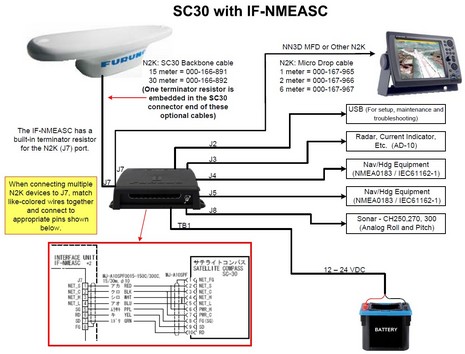
The illustration below is centered on a box called the IF-NMEASC, which can translate the SC30’s N2K messages (PGNs) into NMEA 0183 as well as classic Furuno data formats like AD-10, and it has a USB port. Interesting! In fact, I’d been hearing rumors about a similar box called the IF-NMEA2K1 which can control two way 0183/2000 translations in all sorts of sophisticated ways, and, sure enough, Furuno gave me a link today. It is wickedly expensive, but, as noted, powerful, and besides I’m hoping it’s just one a stream of useful N2K translators and PC gateways that will help make gear the SC30 integrate into any vessel system. By the way, in Miami Furuno showed me some neat NavNet 3D improvements as well a preview of MaxSea Time Zero that looked great. More soon.



I understand how the heave corrections will significantly improve the performance of a fish finder and how important that can be to commercial or sport fisherman.
But what does this do for the recreational boater or sailor? Am I going to see better performance in the radar? Am I going to see better performance in the autopilot?
Will it remove the need for a dedicated GPS in the AIS unit?
Hi Russ,
The autopilot performance will be improved due to 0 wandering of the traditional magnetic compass even magnetic compasses with rate gyros installed
Radar overlay will also be improved because of this.
GPS in AIS unit is still a must im afraid this is purely a safety thing as you can nearly always put corrections in gps systems therefore the ais has its own that cant be altered.
AIS requires GPS for TIMING. The GPS signal provides a syncronized time signal to all the individual AIS units, which helps them to schedule their brief transmissions in an orderly manner.
The “GPS compass” (basically two or three GPS receivers seperated by a known distance) has been available from several manufacturers for several years. These compasses can spit out 20hz true heading, accurate to better than 1/2 degree (no variation, no deviation, no accuracy problems near the poles), plus rate of turn and attitude (roll/pitch). Oh yeah, and position, time, and all the other normal GPS stuff. Work great with autopilots, and your radar/chart overlay is dead nuts on all headings. These guys will be supplanting gyrocompasses in a lot of installations.
Can the FI50002 box also send/receive VGA video signal ?
I’m thinking of using the MFD12 in the cockpit, and send “video out” signal down to my indoor steering position. ( I will use a std PC monitor inside the yacht )
Do I need to connect this extra monitor directly to the MFD12 ?
The MFD12 puts out DVI.
The FI5002 puts is a N2K device. No video.
reginaowner, the Furuno IF5002 is a N2K connector only (power/NMEA2000). What you’re wanting to do is very simple as the MFD12 has a DVI output so it plugs directly into any standard DVI TV/Monitor etc.
Looking at the mfd 12, it has a dvi out but the resolution of the pluged in monitor, for example an neovo X19 is not the same as the output of the mfd 12.
How can you overcome that ?.
p.s sorry for my poot English !.
Has anyone actually installed and used one of the Furuno SC 30 Satellite Compass? If so what are your thoughts?
Yep installed several using the IF-NMEASC and direct NMEA2000.
Very impressive used on 10m power boat and 25m steel trawler.
All report autopilots (Furuno, Raymarine, Simrad, Navitron etc) steer like a dream.
Andy
Furuno loaned me one, Jeff, but I really haven’t tested it much yet (which I feel guilty about). It does seem notably sensitive about having a good sky view, but it also seems quite responsive to vessel motion, as also saw in that second link above.
Ben,
all sat compasses are sensitive about a clear sky.
get them in the right place and they are fine.
Andy
Thanks for the comments Ben and Andy. Boy Ben if Furuno loaned me one I would put it to use for them.
Everything I read it sounds like a very impressive unit. I would think the autopilots would steer like a dream. The radar overlay looks fantastic and I love the way it removes the heaving compensation.
I assume with one of these that you don’t need an additional GPS unit correct? I seen a drawing showing a GPS and the SC 30 wired up and unless it was for redundant backup I didn’t know why the second GPS was there.
Andy would the SC 30 feed GPS data to my PC running MSTZ if the MFD was crashed? I sorta get the impression it wouldn’t.
Jeff
Well I gotten myself into an odd position, Jeff: “too many gizmos, too little time” 😉 From what I know so far, I do think that the SC-30 is a powerful sensor, and, yes, it does provide all GPS messages as well as heading, pitch, roll, and heave. Looking at the manual (online), all seem to be standard NMEA 2000 PGNs except heave.
The manual also notes that the Attitude PGN, 127257, is sent out 10 times faster than the normal 1 time a second. That may account for how responsive the SC30 looks on a NN3D MFD or on MSTZ, but I think it’s hard to separate sensor performance from display software performance. The Time Zero stuff tends to look alive regardless of the heading sensor attached, and I’ve wondered sometimes if MaxSea/Furuno is using a little pitch and roll info to give the displays a lifelike feel.
I’ll be interested to what Andy has to say regarding what happens if the MFD conks out. I think one redundancy strategy is to have a NMEA 2000 bridge to your PC, which can kick in if MSTZ doesn’t see data via Ethernet. I know that will work fairly well with a Maretron USB100 (i.e. NMEA 0183 translations) and also that MaxSea is one of the companies working with the Actisense TPG Gateway (i.e. straight N2K).
Hi Jeff / Ben,
Dont think there is pitch and roll in MXTZ yet (but im sure its coming)
If the MFD goes bang, fizz or similar depending on how its wired will make all the different.
If the N2K is fed into the system via a DRS sensor as it is on the vessel i have the direct N2K SC30 the data is on the network from the radar scanner. but if the MFD that was powering the radar scanner went down you have no output, that is assuming more than one MFD in the network.
what i did in the end was use an AT-10 NMEA 2000 converter to backup all the data to MXTZ on the PC via 0183 but as ben said the Actisense TPG will be working with MXTZ in the future. (this was 2 years ago before the launch of the actisense converter)
I also had to use the AT-10HD to output fast HDT data to the autopilot (raymarine) as the MFD only outputs this data at 1hz not 10hz as most pilots like.
I liked the idea of routing N2K sensors through the DRS radars and NavNet at first, but now I’m not so sure. For one thing, there’s the redundancy issue above. For another, I believe that a NavNet3D MFD will always keep a radar in standby mode unless you put a power switch between it and the radar. But, if you turn off the radar, then the attached N2K devices lose power, too. I know that some sailboats have avoided the DRS N2K port for exactly this reason. Seems like Furuno should let you turn the radar off completely if you’d like, without depowering the N2K port.
I understand Ben about the gizmo’s. At least you can have lot’s of fun playing with them. I’m just jealous.
My plans for my 2000 network was to have everything powered via a NEMA 2000 powertap. That way if the MFD or DRS go down I’m not without data.
I had already planned to use either a Maretron USB 100 or the Airmar U200 to bridge my 2000 data to MSTZ in the event of a failure of the MFD.
So Andy with a 2000 network that’s independently powered would I get data from the SC 30 through to MSTZ? I would think so but not sure.
Also, my pilot requires 10hz so are you saying I need to get the AT-10HD? I see that’s Simrad. How do I make that work with a Garmin autopilot?
I see the Actisense NGT-1 but from what you guy’s are saying that doesn’t yet play with MSTZ? It’s a better price than the other two above.
Jeff
Jeff, I think that if you check the SC-30 manual that it outputs the heading PGN at 10hz. I think Andy was talking about 0183 conversion. If you AP is also N2K, I think you’d be all set. Oh, wait, I see you have a Garmin AP; I’m not sure you can use an outside heading source with one of those because its compass is integrated with its controller (I think). But I believe that it outputs heading over N2K.
The Airmar U200 is very similar to the Actisense NGT-1, and neither outputs 0183. The Actisense NGW-1 is an N2K-to-0183 translator and I suspect it handles 10hz heading fine. The Maretron USB100 is a straight N2K bridge for Maretron’s own software or a 0183 translator for other software.
Confused yet?
Sigh. I knew there was some drawback to the N2K-bridged-over-Ethernet thing on NN3D.
So it now looks like I’ll need to take that mini N2K network up on the top of my mast and run a trunk cable extension down the mast with a terminator on the end. That way if the NN3D MFD goes down, I can just pull off the terminator and connect the mast N2K network to the primary network running through the boat, and hope the “dead” radar connected way up there to the N2K bus doesn’t cause the bus to malfunction.
Whee.
Hi Jeff,
As ben said the actisense NGW-1 would work better as it would spit out raw NMEA data, we did it with the simrad ones as the actisense was not shipping 18 months ago.
With a NMEA2000 network independently powered and fed via a NGW-1 MXTZ would get the data fine, if you use the MFD to feed it via ethernet or 0183 if the display goes down your MXTZ would also
As Ben said im not familiar with the garmin autopilot but will ask Garmin UK to see what they come back with, we had to use the AT-10HD to get NMEA0183 10hz HDT onto our raymarine pilot, if the garmin accepts N2K headding input it would work straight off the bus with no converter required.
The NGT-1-USB is a N2K – PC Interface and is about �120
The NGW-1 is a NMEA2000 – 0183 converter and is about �90
Yes Ben I’m getting confused. But at least this is bringing up stuff for me to ponder before diving in and having problems.
The Garmin autopilot I have is two years old and uses NEMA 0183 versus 2000. I purchased mine about a month before the change over.
And yes now that you guy’s mention it the compass and controller are integrated. I’m not sure you can introduce heading data from another source. If that’s the case then wouldn’t me installing the SC 30 cause inconsistencies with my AP since the MFD would be getting heading data from the SC 30 yet the AP would want to steer with it’s heading data?
I’m wondering now if I could use a 2000 to 0183 converter to get the AP to accept heading data from the SC 30? I would think there’s got to be a way to get SC 30 data to my AP.
I too will try to call Garmin but I’m not real confident I will get a decent answer. Seems like anymore when you call them it’s someone that doesn’t know what they’re talking about.
Andy maybe you have better resources at Garmin.
Jeff
Hi Jeff,
What model Garmin do you have??
Chers,
Andy
Andy, I have the “Gladiator”. This is the model name when these pilots were still made by Nautimatic before they were bought by Garmin. I bought this right as the sale was taking place.
My system is the same as the one they now call the GHP 10. The parts are mostly still the same and the only real difference I see is that the GHP 10 has NEMA 2000 as well as NEMA 0183.
Update: I spoke with Garmin and they told me that neither the Gladiator system nor the new GHP 10 will accept heading data from another source. Their systems are designed to work strictly with their compass ball.
So does this mean that if I go ahead and purchase/install the SC 30 that I will have problems with my system and how it gets heading information.
Example: I input a waypoint from MSTZ or NN3D and it says to steer a heading of 50 degrees and tells the autopilot the same. If NN3D is getting that heading data from the SC 30 and let’s say it’s a degree or two different than what the Garmin system is saying will this cause me problems?
I thought I loved my Garmin system until I found out it doesn’t play nicely with other’s unless you use it’s stuff.
Jeff
Jeff, There are many, many boats with separate compasses for autopilot and navigation. Not a problem, but kind of a waste. The Nautamatic pilots, now Garmin, are a special breed and the performance might be well worth the dedicated compass thing. Besides, why not use the heading output from the Gladiator for your nav system? I’m not sure what all you have, but an Actisense NGW-1 should do the NMEA translations both ways.
Actually Ben I don’t have a problem with my current autopilot and compass. I was merely thinking that if I went with the SC 30 I could get even more accurate heading data for the autopilot.
It’s obvious now though that Garmin only plays with itself (no pun intended).
I was originally interested in the SC 30 for the heave and sonar compensation as I fish a lot in fairly good size waves. Then when I started realizing that maybe it would even improve my heading data further I was intrigued.
I just want to make sure that if I did go ahead with the SC 30 that I’m not going to create problems with having two compasses on the same network.
Gotcha. But be careful not to judge Garmin by one product, and one they didn’t originally design. Overall, I think Garmin’s use of NMEA 2000 is about as friendly with other brands as any of the other major system manufacturer, maybe more so.
Andy, In reading the install manual for the SC 30 it makes it very clear that this unit likes a very clear view of the sky.
I have a limited area where this can be mounted. I’m trying to consider other antenna’s and aesthetics.
I can mount it within a couple feet of my radome and if there I could put it on a pedestal mount that would get it above the dome by about a foot. Would this work?
I can also mount it in another area at the back of my cabin top but that area has rooftop outriggers (these would be lower than the SC 30 on a pedestal) and also holders for my fishing rods. That’s my main concern is that the fishing rods stick up in the air a good six feet out of the holder’s. How critical is any shadow from fishing rods and/or say vhf antenna’s?
Thanks,
Jeff
Hi Jeff,
Do you have a picture showing the locations you could email me?
andy (at) excelsiormarine.co.uk
i will take a few pictures tomorrow of sat compass installs over here and email across to you.
Cheers,
Andy
Hey Andy,
Thanks for the quick reply as usual. I sent you an email with a few photo’s. It’s kind of dark here now but I think they will give you the general idea.
Jeff
Has anyone had a problem with and SC30 losing its heading data. I fitted one 3 months ago with the latest software update for it. I have be on a 3 month trip and it must have dropped its heading 30 or 40 times. It seemed to get worse the further north i went (south of uk, up to scotland, norway, denmark, germany, holland france and back to uk).
Peter, when I first tested the SC-30 I put it on Gizmo’s open aft cabin top (where the Intellian satellite TV dome is in the header photo of the Forum). It sometimes failed in that position, which surprised me as regular GPS antennas work fine anywhere up there. But then I velcroed it on top of the broadband radar bracketed to the front of the flying bridge and it worked perfectly for months. The new position was slightly higher and somewhat further away from the antenna mast, and it made a big difference.
Fitted a SC30 via an IF-NMEASC 3 months ago. Started intimately losing heading data about two weeks ago, steadily getting worse. IF-NMEASC internal tests 1 & 2 completed, no problems reported. Voltage at SC30 OK. Isolated power to all remaining equipment , radar comms etc., no change. Changed cable and check dropper resistor (120 Ohm) , no change. Can’t find a download of the SC30tool.exe, plenty of info about the software on Furuno’s web pages, but no software. Would appreciate any ideas?
you need an agent to do the software upgrade if its 1.12 or lower it will have issues with the heading due to a software issue
Fitted a SC30 to my boat 2 months ago, everything work normal in the beginning, i use IF-NMEA2K1 for converting the NMEA2000 to NMEA0183 and connecting it to my Auto Pilot Sperry AP1500 and JRC Radar, and now i am loosing the heading from 10 degree to 100 degree, is there any people here who is have the SC30Tool.exe for checking the antenna cluster? looking everywhere but got no result. Would appreciate any ideas?
any body can help me to download the software SC30Tool.exe?
Check out the “Software” tab on the FurunoUSA SC30 product page:
http://www.furunousa.com/products/productdetail.aspx?product=SC30
Once you accept the Terms you’ll see several possible downloads, depending whether you want to update the SC30 using a PC or NavNet3D MFD.
I imagine you can also get help at the FurunoUSA forum…
http://www.furunousa.com/Support/Forum.aspx
…and there may be similar support available at other regional Furuno sites if you’re not in the USA.