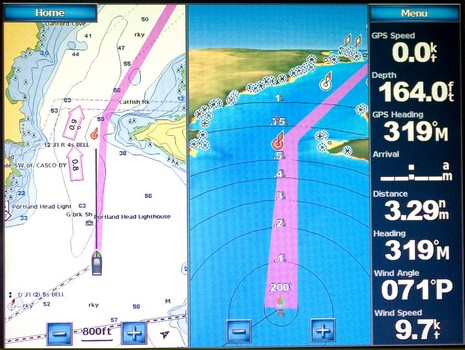
Here’s an entering Portland, Maine, screen photo, bigger here, designed to make a few points re: our discussions of the Garmin Guide To feature and the way the big units display data. This is a Combinations screen and it can have one to four windows with most anything in them, plus the Data Bar if you want. Unlike the largely pre-configured dashboard style data on a regular chart window, you can put any number in the system on that bar. On the 5212, you just touch the field to get list of choices; on the 4000 series you just punch one of the softkeys.
As of today, MadMariner.com joins Power & Motoryacht and Sail as a Panbo sponsor. You may not be familiar with the site, as it’s nearly brand new, but it’s an ambitious operation putting up fresh, and mostly original, boating content every day. Mad Mariner will be streaming Panbo along with its other blogs, which puts it side by side with HardWired, another marine electronics blog written by Jeff McLaren. Jeff is a manager at a Southern California marine distribution company, and also created an impressive set of Raymarine C– and E-Series instructional videos, and I think our blogs compliment each other nicely. Meanwhile, Panbo is poised to cross the 50,000 unique reader mark for September, and that doesn’t include some 15,000 Mac fans who stopped by. And note the advertisers who are braving BlogAds’ kludgy interface to get onto the right column. I thank them all, and especially Mad Mariner, for support that will help Panbo to improve and expand.
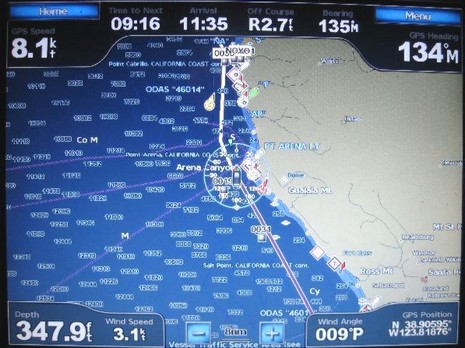
Last week I got a call from Phil, who’s cruising his Tayana 55 down the West Coast, headed for Mexico and beyond. He “loves” his new Garmin 5212, except for an interfacing bug that he’s hoping someone (Garmin?) can help with. Check the photo above, which shows the standard chart display with its dashboard style numerical data. The way that works is that under the Menu key you have four categories of data that you can set to Show, Hide, or Auto (i.e., show only if there’s appropriate data). I know from my own testing that Phil has the “Navigation” either on Show or Auto and hence is getting the info across the top, which is putting him right on his long SE leg toward San Francisco, 9 hours to go at 8 knots. He’s also put “Sailing” data in auto mode (and has the 5212 hooked to his Simrad instrument system), which is why you see not only wind speed and angle along the bottom, but also the wind indicator around his boat icon. I don’t know if he’s set Wind to Apparent or True (or if Garmin can cope with Ground/True subtleties), but the real question is why the heck is that boat icon headed North?
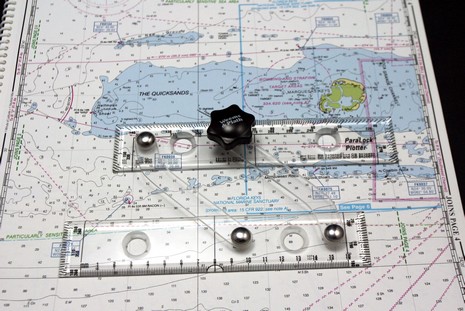
What’s this…a set of parallel rules that didn’t eat right as a child? Nope, the 7.25” ParaLocks were especially bred for taking the lat/long of a waypoint off a paper chart. Put one edge on any handy vertical or horizontal line, spread the rule to your mark (the finger holes help hold it tight to the chart), use the black knob to lock the spread (which can go as wide as standard 15” parallels), and, bada-bing, you’ve captured a measurement you can then take to the edge of the chart or to a scale in order determine a precise latitude or longitude. ParaLocks also have protractor and ruler marks, and do regular parallel rule work nicely on small chart tables and/or small charts, like the 12” wide Maptech Waterproof Chartbook shown. By the way, despite my role as champion of gee whiz electronics, I still like paper charts (and paper guide books). And though I wasn’t a fan of ChartKits when they first came out (um, a couple decades ago), the current versions are great on bigger boats, while the Chartbooks are handy on small boats. Maptech has been doing good work on the print side. Ditto Weems & Plath in the navigation tool dept. ParaLocks are well made and retail for around $22.50.
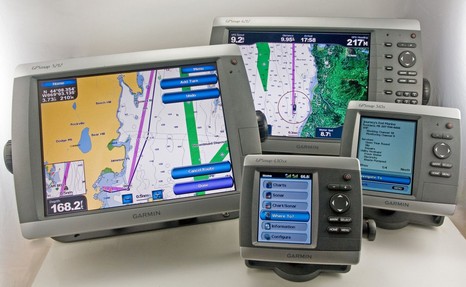
This photo, of which I’m especially proud (talk about herding cats!), is also a great example of how well Panbo can work with magazine articles. It’s the opener to my October electronics column, in which—thank you, PMY—I had the support to seriously ruminate about testing these four new Garmins. But here online I can show you the picture in greater detail, and write the long caption it deserves.
Before you get overly excited, note that so far you can only use this new satellite phone in Asia, Africa, or the Middle East. But according to the Inmarsat announcement, the service will be worldwide by the end of 2008. Like Iridium, the IsatPhone does data at a piddly 2400 bps, but that’s enough for email and file up/downloading, especially with a little help from XGate. And especially when the phone’s expected retail is “about $500” with voice calls at less than $1/minute. The data rate is 9600 when the phone is used in GSM mode; that’s Globalstar speed, but hopefully delivered more reliably by Inmarsat. There will also be a worldwide FleetPhone version of this service—with a down-below handset and external antenna—said to be “ideal” for smaller fishing vessels and yachts. “We are coming to shake up the satellite phone market,” says Inmarsat’s CEO. I think the reaction of a lot of offshore boaters will be: “Bring it on!”
It’s a Panbo first, but this entry is meant only for the various agency and manufacturer personnel who work with the media that covers marine electronics. A hassle they have before the big boat shows is trying to schedule press events that don’t conflict. Often they’ll call each other and/or a geek like me who tries to make every event. That’s why I came up with the idea of an open and easily updated Panbo tentative schedule of FLIBS press events. The Fort Lauderdale International Boat Show is just a month off, and some major events are already on the calendar. There’s even a bit of conflict, which is going to happen sometimes regardless. I certainly don’t want to play referee, but am hoping that Panbo can be a neutral and useful source of information. If the idea works OK, I’ll do it again for Miami, starting earlier.
Well then, rounding out a week of gear that you may need a lottery win to own, here’s something quite unusual called Automatic Sea Vision. The camera I saw at METS last year looked different than the one currently showing on the ASV Web site, but I’m sure the idea is the same.
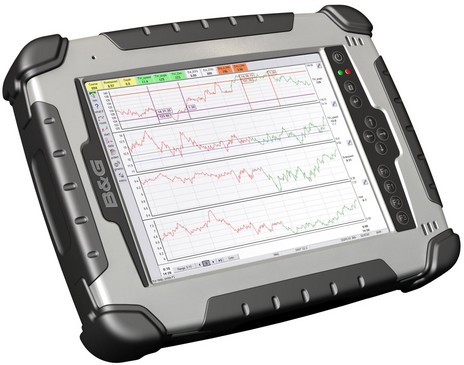
Being a bit of contrarian, I thought I’d put up another high-end display for Panbo’s nattering nabobs to fire upon (just kidding, fellas). Actually, I don’t know what this new RaceVision 3000 costs—B&G is apparently reticent about online prices—but I’d guess it’s a pretty dear 8.4” ruggedized, touch-screen, daylight-viewable tablet PC. The press release suggests that it’s meant to connect wirelessly to a set of instruments—preferably H3000 digitals via B&G’s souped-up WTP2 Processor—and directly to the Web for GRIB file downloads. In fact, the latest 8.2 version of Deckman, which comes preloaded, includes integration with the nifty Ugrib software I tried a while back. At any rate, a full-on race system with a 3000 on deck could really add up.
That’s the hind end of an AmbientNAV 17” Alpha monitor, just announced but not yet up at the company site. Check the bigger shot to see the amazing diversity of inputs available, not to mention the sharp engineering.
When Ask Jack Rabbit recently got the goods on Raymarine’s new 12– and 15–inch G-Series monitors, brochures and manuals included, he hinted that perhaps other models or a coming black box would add “storage and processing capacity.” Apparently so, as here’s the “launch” description from the Southampton Boat Show:
If a 14.5” stabilized dish can look, and work, fine on my 25’ Ralph, most anyone who wants satellite TV on board can have it. But there are a lot more choices since I tested KVH’s great little TracVision M3 in 2006. In the August PMY, I detailed SeaTel’s Coastal 14 and King Control’s Sea-King 9815–RJ, and how KVH had met this competition by rejiggering the original M3 into the M3st, M3dx, and M2 models. The battle was rejoined last weekend when King introduced the Sea-King 1500-HD.
Head’s up, open source programmers. Marcello Ferrero has begun the Amerigo project, navigation freeware meant for PC, PocketPC and WinMobile phones and PDAs. A “PreAlpha” release is out, and Ferrero is hoping some nautical code jockies will join him. One feature that he thinks unique will be the ability to use a Smart Phone with camera to create a photo POI in one click, adding categories and text as desired. But I wouldn’t be surprised to see this sort of feature arrive first from ActiveCaptain’s mobile project, still “under construction”, or maybe EarthNC, or who knows where. Does anyone doubt that Web 2.0 will mash up tight with marine navigation eventually?
Maretron is a little shy about its N2K Analyzer software tool—it’s still in “beta” and there’s still no help file—but I think it’s nifty. If you have an interest in NMEA 2000, take a look at the screen shot full size. It shows the N2K test system in the lab connected via Maretron’s USB100 gateway to my laptop. The software lets me see details of each device in the network, including which PGNs it’s sending. PGN, by the way, stands for “Parameter Group Numbers” but is probably better understood as families of data fields.
That’s an Argonaut Tflex-G615 under that extra layer of protection, just like the one I tested, and it’s connected to a down-below Mac Mini that’s running MacENC. This is on an “unsinkable” ETAP 37 belonging to Bob Etter, who’s a principal at ETAP Charter Lease and apparently a devoted Mac navigator. This shot was taken when he first tried the setup—“It could be brighter…For less that a grand, it is fantastic!”—and I hope to hear soon how well it worked this summer. I do know that he’s added a NSi waterproof touchpad, which looks like a neat piece a gear. It’s made of stainless steel, “vandalproof” too. Apparently it uses “Field Distortion Technology” which means it is not pressure sensitive—“a light touch is sufficient, tracking your fingertip precisely.” But because of “the capacitive working principle, the unit might not work with thicker gloves.” On the other hand (there I go again), “it will operate at all mounting angles and it does not require cleaning or maintenance.” There’s a lot to learn about touch technology. By the way, NSi also makes a trackball with software controlled back-lighting, called the Chameleon, which may well be the source of the neat Palladium visual alarming trackball I spotted at the Ft. Lauderdale show last year.
That’s a Panasonic Toughbook MDWD I tested for PMY back in early 2003, and mentioned here when Nobeltec began selling it as a navigation accessory. It came with a simple plastic stylus—nice for, say, setting a waypoint bang on a buoy—but it could also be fingered. Check the larger shot and see how easy it was to tap common underway controls like zooming using those big buttons in Capn Voyager (or in Nobeltec Admiral’s NavView). Well, I’m a bit shocked to discover that the current model of Panasonic’s wireless display seems to use an active digitizer stylus, and will not respond to a finger.
The product image may be a little fruity—HP calls it the “perfect kitchen computer”—but I think this TouchSmart IQ770 might make one heck of a boat computer. That’s a 19” “BrightView” 1,440 x 900 pixel touchscreen display that responds to finger or stylus. I’ve tried navigating on tablet computers and think that while a stylus is fine for planning it’s not so great for underway work, especially if you get your hands on (sorry!) a navigation program truly designed for finger commands.
Yesterday I got to spend a few hours on a Navionics test boat tooling around Bass River, Cape Cod (unfortunately damnable cars and planes were also involved in the trip). A few of us boating writers got to fool with eight chart plotters, and see first hand what Navionics is up to for 2008 (very cool, but I can’t write about it just yet). Another highlight was spending time with company founder Giuseppe Carnevali. This is not the first demo cruise I’ve taken with this gentleman and I’ve come to appreciate his fathomless enthusiasm for cartography, the technologies that make it better, and boating. He’s been a creative force in marine electronics since he and Fosco Bianchetti developed the first vector charts in the early 80’s. Yesterday it occurred to me that with Bianchetti selling C-Map and Darrell Lowrance finally retired, Giuseppe is one of the last of his generation still pushing this field forward. And he’s going strong.
Type my zip code into the Sprint coverage map and you’ll get the above. The green color indicates some level of service, but the little dots mean “Signal strength information unavailable.” Well, when I queried AnyTrack last week, a tech there told me that “usually, in areas with this sort of coverage there is very spotty Sprint cellular coverage.” I’ll say!
As suggested yesterday, boaters who already have Globalstar phones—or are trying to decide between its lower rates and faster data versus Iridium’s greater reliability and range—want to know when Globalstar will fix the amplifier problems that have plagued duplex service over the last year or so. One bit of news is that Globalstar is now offering an online Optimum Availability Report. I can’t report first hand on its accuracy, but a bigger look at the screen above suggests that, at least around Bermuda, the non-optimal times are somewhat lengthy and thus this list might be really helpful. (A Panbo reader who is struggling with a new 1700 in the Bahamas, and who we’ll hear more from, calls it the “Gap Report” and notes that it’s frustratingly difficult to access with his…satellite phone!) But what about those four new satellites that went up in May? Globalstar recently told me this:
When I sailed from Bermuda to Maine in June, the happy electronics story was testing a Class B AIS. But there were other stories, like getting to try Iridium and Globalstar satellite phones side by side. One reason I’ve been slow with it is that neither phone seemed a real winner. In fact, that’s Vision of Johanna’s owner Bill Strassberg expressing our occasional “throw them both overboard” feelings.