

New Simrad Autopilots, 100% NMEA 2000, almost
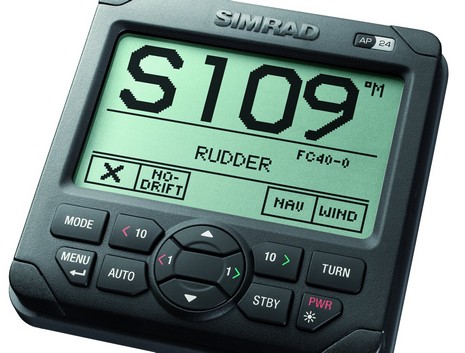
So Simrad has introduced two new auto pilot control heads, the AP 24 above, and the larger AP 28. As best I can tell they both enable the same rich suite of AP features, which include steering patterns and steering to a contour (both appreciated by trolling fishermen), ROT control (which I think means turn rates adjusted for G force), virtual rudder feedback (i.e. rudder sensor not needed for outdrive installs), and “No Drift Course” (even if you just set a course, the pilot creates a virtual waypoint and corrects for current and leeway). But the really big change from previous Simrad models is that these heads use SimNet, a cable modification of NMEA 2000, to communicate with new AC12 and AC42 pilot computers as well as with SimNet rudder and compass sensors included in Simrad’s new IS20 instrument series (which also looks interesting).
Of course this means easier installation as dedicated cables don’t need to be run to various system components. And to some degree it means easier compatibility with other manufacturer’s gear. But that could involve a lot of SimNet to N2K patch cables if, say, you wanted to stay with standard N2K cabling, and I’m not positive that Simrad is using standard N2K PGNs whenever it can (the manuals aren’t up yet, and the brochures don’t list specific PGN support as Furuno so nicely did). I will try to find out more at METS next week, where Simrad will be introducing some other new and significant products.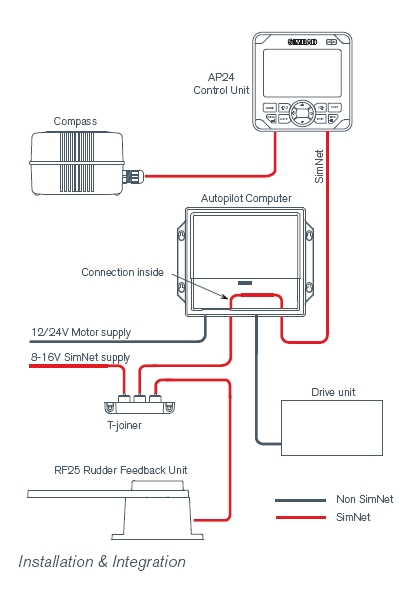



I have concerns about LCD displays. I found that if you are not at the right view angle they are hard to read. So in the sailboat I delivered to the Caribe it was almost impossible to read the display, because of where it was mounted… convenient to the helm, but lower in the combing. I don’t care for pressing buttons to set a course or correct it. Dials seem to be more intuitive.
The beeping off course sound was hard to hear in violent weather as well. Aside from that Autopilots are great crew, they don’t complain and consume any stores.
With 12 or 13 buttons (click in center?) that is almost as many as my chartplotter, but concentrated in 4 square inches.
Thats just too many.
DefJef-
You certainly illustrated your comment quite well…..
“great crew, they don’t complain”
All kidding aside, todays LCD dispalys have improved to where viewing angle should not be a major concern. And if a pilot is set up correctly you shouldn’t need to fool with it much.
As far as alarms, most today have a remote alarm output as does much electronics gear since it’s not just heavy weather that blocks the noise, engines can be noisy too.
What good is an “almost” compatible network? Close doesn’t count in networking. How many dealers are going to stock a nice supply of SimNet adapter cables? They have “special order” written all over them.
I’ve got an AP16 now, and I thought the buttons wouldn’t be as easy to use as the AP26 I have. I was wrong. It’s actually easier to use. There is a button to change 1 degree and another to change 10 degrees. Once you get used to it (which is easy), it’s very quick and easy to use.
I can change 20 degrees exactly in 2 button pushes.
There is also a lot of information on that small screen, but again it’s organized in such a way that it doesn’t seem crowded or confusing.
Drat. I just ordered an AP25 and a set of IS-15 instruments. I’m pretty sure I’m going to have to rethink the instruments now; the IS20 graphics display is exactly what I have been looking for.
Now I have to decide if I should go with their new autopilot as well. What benefits does it offer to a large heavy displacement trawler over the AP 25?
(This is just after telling the shipyard that I do not like changing my mind once I finally come to a decision.)
Too many buttons. Can’t they take some of the configuration of the autopilot and move it into either soft keys or out of this control and into the chartplotter ??
My ideal autopilot head has either a rotary knob, or simply six buttons auto/standby -10 -1 +1 +10, and a button to turn the display into a depth or speed indicator instead. A special indent on the -1 and +2 buttons would be nice.
That way
1. My helmperson can learn it in about 2 minutes.
2. I can reach over from in front of the wheel, find the right buttons, and press them blind
I like the looks of the AP28. From the picture it looks like the dodge buttons may be a little hard to get to (I would probably use the knob instead) but the angle may just make it look that way. It would be nice if they would update their remote control to make it a bit more ergonomic.
I swear I didn’t know it was coming … I complained there was too many buttons, and my ideal autopilot had 6 buttons.
Garmin has delivered, in fact they just have 5 buttons in their new product just mentioned on AskJackRabbit, … I just hope that a 20 degree turn dosn’t require 20 x 1 degree button presses !
Hey, Dan, I just saw a demo of the Garmin AP interface, still under construction. Right now there doesn’t seem to be a “dodge right 10” command, just a hold down right button and it starts reeling off dodge size until you let up. I think Garmin might appreciate your input on what to do with those few buttons, but please put it in the Garmin instrument entry. As you saw on Ask Jack Rabbit, the AP head is the same.
Ben, send Garmin my telephone # and email contact information, I would be happy to chat with them.
Hi Ben,
Glad you’re back on this side of the pond. I know you must be near overload with all the new stuff you’ve reviewed lately.
I have decided to commission the new 44′ that Kady Krogen is going to deliver to me in Stuart, Fl instead of here in the Chesapeake. That will be in February according to Krogen’s Tom Button. Fl is a bit warmer in Feb than the Chesapeake!
I really would like to hear from anyone who has done new electronics on their boat lately. What they did and why and do they think that the availabilty of new N2K stuff would have made a difference in their decisions. Thanks,Ray
Ray, I can answer, I just setup my new Beneteau 393 last year, as described under “features” in Panbo.
N2K doesn’t go all the way, but it combined with some other changes (like a standard for radar cabling, and an N2K standard for letting on vendors displays show another vendors sensor data) wouldn’t make it such a engineering challenge to add new electronics to my one year new boat, which ultimately prevented me from making 4 additions this year (add ultrasonic weather station, upgrade radar 2kw–>4kw, add AIS, add solid state compass).
Looking at just N2K making a difference alone:
1. If I had N2K in my sailboat mast originally, I would have the option to replace my wind sensor with a Maretron or Airmar weather station. Without N2K, I have to delay my purchase until a time when I have my mast down for other work as the $2,000 of yard work to unstep and step the mast is prohibitive. However, even when my mast comes down … I am not thrilled I would need to purchase a dedicated display for the weather station, since one vendors N2K display won’t show all the information from another’s N2K device.
2. There are some areas of my boat where each incremental cable run is not economical due to conduits either being full, or in one case crushed in the manufacturing process. Had I used N2K (or more like, when I), I would have more options to add or reconfigure communication between my instruments, and my conduits wouldn’t be full to begin with. Case in point .. right now I cannot improve upon the NMEA 0183 wiring to get my DSC radio to output a position. It was wired to receive a position from my chartplotter, and cannot easily be upgraded without adding a multipler, or running a wire thru a full conduit to a spare nmea 0183 port I have on the other end of the boat.
3. Redundancy and option to run at lower power consumption. With N2K, vs NMEA 0183 & seatalk, I will have fewer single points of failure, and the option for vital components to work without having to power up all my gear, as I do today. For example I would like the option to operate my sailboat with my two chartplotters turned off, and still have my sensors display data to my ST60+ displays (e.g. wind, depth, boat speed).
I just got the manual for the IS-20 graphic, and I am definitely going to purchase one. It is not highres color like the Garmin or Maretron but I think it fits the bill just perfectly.
It looks like it handles just about everything. You can have one large number, a number and a trend graph, or groups of up to four. It handles just about every message that you can imagine including engine data.
The one thing that I would like it to have that it doesn’t is a GPS drift chart for anchoring — you can get that on your chartplotter but I like something in a low power unit. My old Raynav had that feature and I found it useful.
Aside from that, put this next to a wind instrument and it does everything that I could ask of a small instrument.
I just installed a complete Maretron system,ie. wind,compass, depth/speed/water temp,tank monitors, gps,2 displays and usb. This interfaces with a new Simrad AP-16 by a single simnet cable with one end replaced with a Maretron field attachable connector. It went together with no problems and has performed flawlessly.The AP-16 displays everything on the N2K buss. and the Maretron displays the rudder position.The USB feeds my laptop running the latest Cap’n . I also have a Milltech AIS feeding into the laptop giving me excellent positional data on the charts. It has been very useful while navigating the inland rivers with all their tug and barge traffic as it allows me to call the tugs by name rather than identify them solely by position.
I need an AP 21 but it’s discontinued.
Can anybody help?
Thank you.
Marco Benagli.
just read bob’s comments about interfacing the simrad ap-16 with the maretron system and would like additional information or his comments concerning that installation. thanks
Simrad AP28/AC42N (NMEA2000 course computer)
It’s time for Simrad to update the software on the AP-28/AC42. After a two month (summer 2015) coastal cruise with my new Simrad AP28 I have some good news and some bad – all my opinion of course.
This is the third autopilot in several decades of sailing that I have worked with and installed myself. Only the first autopilot was pulled out due to malfunction. The one after it was installed because I wanted more up to date electronics and finally I now have the AP28. My drive system uses a Kobelt hydraulic ram and adjustable speed pump and is totally trouble free.
Lets start with what I like about the AP28. This pilot is the best in difficult sea conditions. It is better then any autopilot I have used so far. No autopilot does a terrific job in following seas, but the AP28 steering algorithm is the best I’ve experienced. Steering accuracy is outstanding even in cross wind and cross current situations. Route following precision is spot-on accurate. Even after all the years the AP28 has been available it still has a terrific button layout and looks up-to-date.
Now, the bad stuff. This is not an “Auto” “Pilot” it is merely a steering device that requires the helms person to stand in front of it, full time, when following a route generated by a chartplotter or computer navigation program. You can not leave the helm! Now I know many autopilot owners only use the device to follow a heading, (AUTO) but the AP28 like many autopilots, have a feature that allows “route following” (NAV mode) which I personally use extensively. This feature allows me to get my head out of the electronic screens to look across the water for traffic, Nav aids, weather and to sail the boat. It gives me freedom knowing that a very carefully planned route is going to be followed by my autopilot with extreme accuracy.
I am mostly a singlehander. When in “Route Following” (NAV) mode the AP28 has an inaudible alarm that sounds whenever the waypoint requires a turn of 30 degrees or more. With the engine running or wind in the rigging a normal hearing person will not be able to detect the alarm. There is an external alarm output terminal on the AC42, however, it does not output all alarms. In fact, it does not output an alarm for waypoint changes when in NAV mode. Other alarm conditions do get sent to the external alarm output, but 45 seconds after the initial alarm sounds at the AP28 control head.
If you miss hearing the low volume “waypoint turn alarm” at the control head the AP28 automatically reverts to AUTO mode and continues straight regardless of traffic, land, rocks or buoys. In my opinion, this is downright dangerous. Even if offshore or well off the coast, having the AP28 convert from NAV to AUTO, undetected, can put you well off-course by the time you notice the change. In tight quarters it can put you on the rocks. It seems Simrad wants a person standing behind the AP28 all the time which makes this product NOT automatic in any way. It’s certainly not an autopilot for a singlehander. I guess Simrad designed this feature to reduce their liability but instead created another liability.
The ideal solution would be a software update that would provide some choices.
1. During the commissioning of the AP28 please give those mariners who wish to follow a route the choice of eliminating the need for acknowledging waypoint turns. I’ll agree to a liability waver for the Simrad attorneys. Make this truly an Auto Pilot by allowing full route following without tethering a person to the helm to baby sit the AP28’s low volume waypoint turn alarm.
2. Make the AC42 External Alarm output trigger at the exact same time as the alarm on the AP28 and make it alarm for all alarm conditions. Another words eliminate the 45 second delay.
For the most part, I really like the Simrad AP 28. It’s accuracy is second to none, but the issues above are so disconcerting for me that if some solution can’t be found I would be tempted to sell the system and move on. Not doing so is an accident waiting to happen.
Richard, there is a setting for the AC12/AC42 which in my Simrad NSS autopilot configuration is called “Navigation change limit” with explanation “A course change more than the limit will require verification”.
There are 3 values to chose from: 10°, 20° and 30°.
Is your unit already set to the highest value? If not, choosing 30° may improve your situation.
But generally I agree. I, too, would prefer a way to completely disable this verification of a NAV mode course change. In confined waters or near other traffic you need to look around permanently anyway. More than a few times I have had the boat make a sudden course change, sometimes 30 or even 60 degrees, due to us passing over a buried power cable (the Baltic is shallow and there are lots of power cables between the Danish isles).
However, my AC12, AP24 and HLD2000 have taken my family and me through our sabbatical cruise of 6000+ nm with the autopilot steering 99% of the time. On one occasion I have not disengaged it for 8 1/2 days/1250nm and it was my trust in it that allowed me the sleep soundly off watch so I am not likely to trade it for something else.
I wonder if the new Bluetooth remote would signal the course change alarm and allow to dismiss it?
I have the WR10 wireless remote and it don’t beep when I change the course so I doubt it has any sound at all. I haven’t tried following a route with the remote yet.
Henning, thanks for the suggestion. I do have the “Navigation Change limit” set to 30 degrees, but in one case I missed the low volume alarm at a 31 degree turn. The AP28 converted from NAV mode to AUTO on its own and continued to steer straight. Since I was on deck watching the boats orientation and realized we were heading for a granite ledge I rushed back to the helm and put the autopilot in standby to steer away by hand. With over a hundred waypoints in my route between Maine and NY I can’t remember the degrees for every turn about to come up next. Without knowing how many degrees the next turn requires, virtually keeps someone tethered to the helm to push the approve button. Personally, I would rather risk having an autopilot that makes all turns in the route regardless of the degree and without requiring user acknowledgement and know it will never decide to change modes on its own then to be stuck monitoring every turn. At least we should have a choice so those who like the AP28 the way it is can have it as is and those who are willing to do without required turn acknowledgment can chose this as an option.
I’m sure Simrad did this for liability reasons, but never considered the liability involved with an autopilot that changes mode on its own taking a vessel onto an unplanned path. In addition, the low volume alarm is a contributing design flaw.
If the new wireless remote has a loud alarm this may be helpful, but so far I haven’t heard that an audio alarm is part of the new remotes feature set.
Rich Cassano
I have a AP16 that just quit working and it appears the problem is the head unit. Does Simrad make a replacement part for the head unit?
Mel, That’s a question Simrad Tech support can easily answer with a high degree of accuracy. I would give them a call on the phone or send them an email.
If you consider upgrading to new equipment like the AP24 or 28 & AC12 or 42 be sure the feature issues mentioned in this thread above are not a problem for you. Depending on how you use your autopilot will determine if the low volume alarm and delayed alarm output on the course computer are going to be restrictive and keep you behind the helm.
Also, be aware that if you are in NAV mode following a route from a computer of chartplotter and miss a waypoint turn alarm the Simrad autopilots are programed to self convert from NAV to AUTO and continue off course on the last heading. I keep trying to get Simrad to change this in their software and give the end user a choice to acknowledge or not, but I doubt my requests are ever heard.
Good luck on finding a replacement for your AP16