

Tiki Navigator, worth a look see
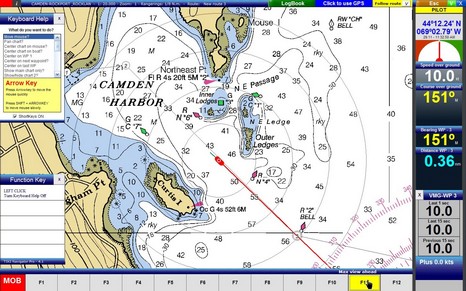
It’s worth checking out this screen shot in all its colorful pixels. Tiki Navigator is slowly gaining a devoted following, largely for its clean and attractive interface. I made this screen show some interesting options like the context sensitive help windows and the function key map, but they disappear completely if you want them to. Tiki only shows raster charts, but otherwise seems to have a lot of features, depending on the version you choose, all reasonably priced.



Hi ,I download the demo version , but i have problem to setup the GPS.
I have a NMEA 0183-Generic V3.1
I checked that the divice is working properlly and the TIKI Navigator is recibing the SAT info but it is no recognozing the info.
Any Idea ?
Because i want to buy Tiki Navig. looks very simple, butif it isno working with the GPS, i will not,
Tks for your help
The demo version will not accept GPS data BUT if you go to the help menu (right edge of screen at bottom of list) you can select a function that tests your GPS data link and shows what’s happening. I’ve used several NMEA GPS input devices including a cheap £30 unit and TIKI works perfectly.
CAN SOMEBODY GIVE ME SIMPLE DIRECTIONS HOW TO MAKE A FOLDER FOR MY BSB CHARTS SO TIKI NAV. WILL FIND THEM.
THANK YOU
CAPT PHIL
CAPT PHIL,
FROM MSDOS ROOT TRY:
MD CHARTKIT
CD CHARTKIT
MD BSBCHARTS
CD BSBCHARTS
COPY D:\*.* [D:\ “ASSUMES CHARTS LOCATION”]
Hope this helps, Capt Craig
=================================================
Where can I get a version of Tiki that runs on 640×480 laptop screen?
Capt Craig